Thursday, July 27, 2006

Cingular "Taking You for a Ride"

Do you know what you paying for dialing 411 on your your mobile phone? I recently opened my bill from Cingular Wireless to find an annoucement that said beginning August 11th, every time I dial 411, the charge will be $1.79. Is that just WRONG or what!?

I feel like Cingular is taking their mobile clients for a ride! Quick, jump out - you notice I'm not in the backseat any longer...

Next time you're out driving and you have to use directory assitance from your mobile phone, just remember it's costing you a pretty penny! Don't leave home without Googling where you are going!

TK

Tuesday, July 18, 2006

Stuffbak.com - You've Got to Have It!

I posted this in February but I'm bringing it back... this product is so dang handy you've got to get it and use it! Read first - buy later... later today!

Some time ago I was in Salt Lake City for a training program and as we wrapped things up and headed home we had to return our rental car.

As we pulled into the rental car return line and grabbed our luggage I noticed my computer bag was a little "light" so I opened it up and presto - no laptop! Freaking out... I threw my luggage back in the car and sped back to the hotel (to the objection of the Avis rep who was shouting something about stolen car status) to locate my precious cargo.

12 minutes later I pulled into the Sheraton Hotel and ran to the spot I recalled leaving my laptop. It was gone... but good fortune and a good Samaritan had found me and my computer. After a BIG thank you I raced back to the airport and caught my plane with time to spare.

Question 1 - What if I couldn't recall where I'd left my laptop and the same good Samaritan had picked it up? With my super-spy password protection they would never have been able to contact me...

Question 2 - What is available to help nice people return valuable stuff?

Answer 1 - Bummer

Answer 2 - Stuffbak.com

Stuffbak is a cool looking label product (very official visual - see below) that lets you plaster all your stuff i.e. laptop, mobile phone, PDA, MP3 Player etc. with an 800 phone number. When someone finds your goodies they call the phone number and Stuffbak arranges the return of your item.


Place these little babies on all your cool stuff...

The process is easy. For just a few bucks you can buy the labels from Stuffbak. Once they arrive you go to their website and register the labels. The best part is your phone number, physical address and email address are safe from public view - very confidential.

Then place the labels on all your important business and personal stuff that you don't want to lose - permanently.

Stuffbak makes it FREE and easy for finders to return your lost item. You pay nothing until a lost item is found - and then you only pay a $14.95 handling fee, plus the cost of shipping.

Check out www.stuffbak.com and place these things on everything but your kids! I've labeled my car keys, laptop, mobile phone and brief case. Still have some labels so the children may not be out of the question!

TK

Sunday, July 02, 2006

Email Efficiency

Technology is doing great things for individuals and for business. Efficiencies are created when technology is applied the right way, and when utilized, we can realize more time and be more organized.

One way to realize these benefits is to handle email more efficiently. I have a routine that I engage in every few evenings a week. After arriving home and dropping my bags I go to the place where our U.S. Mail is stashed. Once found, I spend the next five minutes determining which pieces are non-junk and junk.

It’s getting tougher to determine junk from the good stuff… can you relate? I have to open mail to determine if it’s something important that I wasn’t prepared to see or if it’s just the next hot design by a firms marketing department. After that step then I make piles for monthly bills, things my wife needs to see, things that I need to respond to that are not monthly bills.

This is my life – well five minutes a few times a week anyway – and technology can’t fix this... yet.

However, my other mail experience, email is much cleaner and I get 10 times the amount of mail online than I do from the postman. Here are a couple of things I do and recommend to you:

1. Use a SPAM filtering service. My company uses Spam Soap and I highly recommend it. Spam Soap is a service where you register your email domain name and after doing so, every email that is sent to your address goes through SPAM SOAP servers before it can get to you. Every day they send you ONE email that reports the messages that have been filtered.

My quick estimate is that 99% of the crap that could come my way – doesn’t. Once in a while I’ll open the email they send to check and see if anything I’m looking for has stalled on their servers and sometimes I catch a newsletter… but it’s rare that a normal email from someone doesn’t make it through. Huge recommendation for Spam Soap.

2. Turn off your automatic retrieval of email. This may sound crazy, but think about this, what if every time a piece of mail was available to you the mailman drove by your house and but it in your mailbox and you were required to go out and get it. Every time…

What a waste of energy. Every email that arrives that you open immediately means something else you were working on just got the “mental shaft” and you have to start focusing all over again once you’ve read and dealt with the email. If it happen once a day that would be one thing, but what if it happens 30 to 50 times a day?

Turn off automatic send and receive and check mail at predetermined intervals and watch your productivity improve.

If someone is asking an important question and you feel a conversation starting up over email – pick up the phone and spend 2 minutes going over the details. Save your time and their time!

3. Create subfolders in your email program and set rules for incoming mail. I’m surprised at how few people use this important feature. When I open email in the morning I can actually watch 20 to 30 messages being sorted into the right “sub” mail box. Anything message left in the “main” Inbox is something I wasn’t expecting. Everything else is in its own box sorted by group or individual.

Try these three suggestions and see if you don’t become more efficient working with email.

TK

Wednesday, June 28, 2006

Free Business Cards on the Web

I found a company on the web today from a person who was visiting my office. He handed me a "personal" business card and said that he found the cards online and they were free... I like free.

The name of the company is Vista Print and their website is www.vistaprint.com and it's worth taking a look at if you are in need of printing your own business cards. Vista also prints other products like stationary and envelopes.

By simply entering your contact information you can build a business card with Vista Print's online tools within about 60 seconds. The first 250 business cards are FREE and you only pay $5.25 for shipping. Not bad if you're starting your own little business or just need another solution for your business card supplier. If you need your job rushed, they can do a 3 day turnaround. From my experience with printers - 3 days is quick.

As you begin to finalize your transaction and sneak off the site with 250 FREE cards Vista Print throws all of these other items at you that may want to add to your order, and since you've entered all of your contact information, they personalize each item and you see how they would look with your name on them - things like notepads, stationary etc.

It may sound crazy, but it didn't bother me a bit to have to go through what might seem like a gratuitous add on sale display to someone else. To me it was like I was shopping for office supplies... and who doesn't like shopping for office supplies? Show me someone who doesn't like Staples or Office Max and I'll show you someone that isn't actually ALIVE.

Vista Print may have a solution for you. Check it out.

TK

Monday, June 19, 2006

Ventura Technology Briefing

Thanks to everyone who attended our Sales Technology Briefing in Ventura County (held in conjunction with our Becoming a Top Producer seminar.) Here is a list of the products, services and websites that we reviewed during our event:

Results Seminars
www.closemoresales.com
This is our official site that tells you where we are going with our events and what's happening in our group. Check it out!

Nightingale-Conant
www.nightingale.com
NC is THE name in the personal development industry. Check out their website and you'll discover an entire world that you didn't know existed... dedicated to improving your sales career and your life!

Bankrate.com
www.bankrate.com
Everyone who deals in interest rates and financing should bookmark this site! What is happening on a daily basis in interest rates is kept up to date for you by Bankrate.com.

Send Out Cards
www.sendoutcards.com
This is a cool site dedicated to helping you stay in touch with your clients. Pick the cards that you want to send and this group lets you customize the card and even sends it for you. This is a truly automated BUT personal process. You have to see it to believe it.

Stuffbak.com
www.stuffbak.com
This was our featured site. Stuffbak makes a label product that you can attach to all of your personal effects (keys, mobile phones, PDAs etc.) This is a no brainer. Buy these and put them on everything before you lose it and some nice person keeps it because they don't know who the heck you are!

Google
www.google.com
Have you heard of this company? Duh. Of course you have... but are you using:Google Alerts?Google Desktop?Google News?Google Gmail?Google Earth?Google Calendar?Remember, it's all FREE and all capable of assisting you be more efficient.

Anchor Free
www.anchorfree.com
This is the website that lists different locations in Ventura that offer FREE access to Wi-Fi.

Broadband Access:
Verizon www.verizonwireless.com
Sprint/Nextel www.sprint.com
TMobile www.tmobile.com

Business Card Scan Product
www.cardscan.com
This is the cool business card scanning product that can scan cards directly into your Outlook or other contact management software. You can type in 100 calls in 4 hours or scan them in 10 minutes. You pick!

Start Your Own Blog
www.blogger.com
Good for staying in touch with clients and getting your presence on the Internet. Remember - this one is FREE.

Remember... 5 things in 72 hours!

TK

Monday, June 12, 2006

June Tech Review - Apple Video iPod

Last year I amassed too much money into my PayPal account in an attempt to buy tickets to the USC vs. Notre Dame football game. I won the tickets I was after, but the payment end of things didn't work right... I paid twice and still had to send the seller a check.

The result... my son Chris and I saw one of the greatest football games in college football history. I also had about $1,500 bucks in my PayPal account that had to be used up. So I went on a shopping spree.

One of the items I picked up was the Apple 30 GB Video iPod. Have owned a number of MP3 players and an iPod Nano I wanted to check out a full-sized iPod and see what all the hype was about. Was "video" and 30 GB really that impressive and really needed? The answer - a resounding YES!

First and foremost, the 30 GB unit does a complete backup of my music library. I don't have to management my sync list like I do on my Nano... hook it in and my entire music collection is not only backed up and safe, but ready for me to use. How long does it take - let me check - 40 seconds to back up 16 GB of content. Not bad... (of course it's only updating new content such as recent music purchases and Podcast updates.)

In all of my previous music players I had to pick and choose what content I wanted to sync and what had to be purged. Not every song could come along for the trip. 30 GB fixed that challenge.

What's the other cool feature of the video iPod? The video. Not only do I have my music, I have some of my favorite shows such as LOST and 24. The screen is small but when you put the iPod like 8 inches from your face - looks like a big screen - no joke.

I need to figure out how to get movies onto the iPod. Does anyone know how to do that? If I could take just one or two classic flicks on every trip I could be occupied the entire time!

TK

Friday, June 02, 2006

Motorola Q Hits the Market

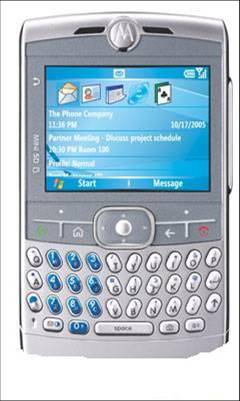
After lengthy delays the “Moto Q” has hit the market and is available on the web from Verizon Wireless and only Verizon Wireless. Once again a really cool phone is locked up by one major carrier – I hate that!

Beyond my disgust for the evil workings of the mobile phone industry and my Motorola stock shares laying stagnant for the last six months - I think the Q is a winner.

It’s thin (like a Razor), doesn’t have a stylus (like a BlackBerry) and runs Windows Mobile 5.0 (like a lot of other new devices.) Back to thin… it’s as thin as a Mont Blanc pen at .45 inches. Only the BlackBerry 8700c comes close. The Treo 700 units are bricks compared to the Q.

Unfortunately what the Q lacks in thickness it makes up for in length. The Q is 3 feet long… okay not true. The Q is long though, measuring over 4.5 inches in length it’s just a hair too big. I took an eraser to it and it looks better like this:

Even though it is “super-sized” the scroll wheel makes operating the Q with one hand a possibility. Just like a mouse on a desktop or a touch pad on a laptop, all smart phones are going to feature a scroll wheel for easier navigation.

Of course one feature that you get with Windows Mobile 5.0 is the mobile versions of Outlook, Word, Excel and a host of third party software that has been, and will be, developed in partnership with Microsoft. This is a huge advantage over BlackBerry devices. Word and Excel files transfer easily and require no third party software assistance.

I like the mobile version of Windows Media which easily plays music files and video. I wouldn’t ditch my iPod if I started using the Moto Q… but it would be nice to always have a few tunes in your pocket.

QWERTY key board and high speed access to the net make the Q a player in the smart phone marketplace. It’s $199 with a two year service agreement with Verizon. $110 a month gets you 1350 minutes of talk time and unlimited data usage. I’d give it a try.

TK

Thursday, May 04, 2006

May Tech Review - Google Earth

In my technology briefings that I do across the country I feature a host of Google products including Google Earth and ask the rhetorical question... "how do these guys make money?" For a company that has stock price that continually flirts the with the number "400" ($400 dollars this is) I'm amazed that everything it puts out is FREE (and in beta too.)

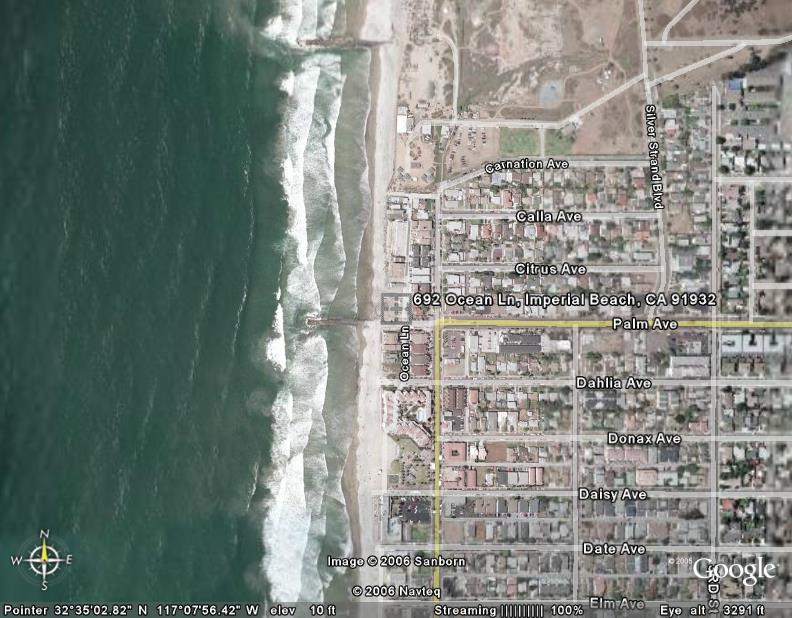
Google Earth is a cool product that's for sure, but it has a number of great business applications too. For example, I was offered an opportunity to rent a beach house in the San Diego this summer. Let's just change the word rent for the word BUY... Okay, I have a real estate deal (I can use the word buy and deal now - for all you Results team members) to invest in some beach front property in Imperial Beach just south of Coronado Island. Sounds great.

However, I've spent A LOT of time in San Diego and don't recall ever sun tanning on Imperial Beach. So I grab a map and find out that Imperial Beach is the southern most beach in the continental US... only 3.5 miles from Tijuana, Mexico. That seemed a little scary to me considering I have little ones that will be running around the place. So I checked out Google Earth and here is what I saw...

Amazing. I saw beach and that was enough for me! Actually with a few zoom features and measuring tools I found out the place was only a few miles from the Hotel Del Coronado. With neighbors like that, the location can't be that bad.

So I'm only renting... maybe some day I'll have a home on the beach. Google Earth is a great tool for anyone in the real estate industry or anyone who is interested in real estate investing.

There are some great tools in this program too. You can lay in roadways, borders, eaterys, banks etc. Directions and measurements are easy in Google Earth. You have to use this program to experience the coolest feature... "flying" from one destination to another. Try this, start at the White House and then fly to Buckingham Palace... You'll move across the Atlantic Oceans in seconds and be staring down at the Queen before you can say "Fish and Chips."

Check it out. I'll be featuring a number of Google freebies this month.

TK

Monday, April 24, 2006

Las Vegas Technology Briefing

Thanks to everyone who attended our Sales Technology Briefing in Las Vegas (held in conjunction with the Results Seminars Top Producer program.) Here is a list of the products, services and websites that we reviewed during our event:

Results Seminars
www.closemoresales.com
This is our official site that tells you where we are going with our events and what's happening in our group. Check it out!

Nightingale-Conant
www.nightingale.com
NC is THE name in the personal development industry. Check out their website and you'll discover an entire world that you didn't know existed... dedicated to improving your sales career and your life!

Bankrate.com
www.bankrate.com
Everyone who deals in interest rates and financing should bookmark this site! What is happening on a daily basis in interest rates is kept up to date for you by Bankrate.com.

Send Out Cards
www.sendoutcards.com
This is a cool site dedicated to helping you stay in touch with your clients. Pick the cards that you want to send and this group lets you customize the card and even sends it for you. This is a truly automated BUT personal process. You have to see it to believe it.

Stuffbak.com
www.stuffbak.com
This was our featured site. Stuffbak makes a label product that you can attach to all of your personal effects (keys, mobile phones, PDAs etc.) This is a no brainer. Buy these and put them on everything before you lose it and some nice person keeps it because they don't know who the heck you are!

Google
www.google.com
Have you heard of this company? Duh. Of course you have... but are you using:
Google Alerts?
Google Desktop?
Google News?
Google Gmail?
Google Earth?
Google Calendar?
Remember, it's all FREE and all capable of assisting you be more efficient.

Metro Free
www.metrofreefi.com
This is the website that lists different locations in Vegas that offer FREE access to Wi-Fi.

Broadband Access:
Verizon
www.verizonwireless.com
Sprint/Nextel
www.sprint.com
TMobile
www.tmobile.com

Business Card Scan Product
www.cardscan.com
This is the cool business card scanning product that can scan cards directly into your Outlook or other contact management software. You can type in 100 calls in 4 hours or scan them in 10 minutes. You pick!

Start Your Own Blog
www.blogger.com
Good for staying in touch with clients and getting your presence on the Internet. Remember - this one is FREE.

Remember... 5 things in 72 hours!

TK

Friday, April 21, 2006

April Tech Review - Send Out Cards

Check out http://www.sendoutcards.com/ if you’re looking for a fast and efficient way to stay in touch with your clients. Send Out Cards is a product that my friends Jeff and Adam Packard turned me onto last year. I’ve used it and also witnessed it become a better product.

A quick overview of the service…

Send Out Cards allows you to take your contacts from Outlook or some other database and import them in their online database. Once your contacts are on the Send Out Card servers you’ve got a back up of your data – nice side benefit.

From the website you can select a contact and send a card to them using the automated selections for the occasion, the type of card, the type of message and other cool features. Some of my favorite customizations are my own custom message, adding photos and even using my own handwriting!

My handwriting? Yep – simply fill out a form and fax it to SOC and they’ll scan your own handwriting and you can choose to make a card look just like you wrote it. Pretty sweet.

The cards come with a stamp (a real stamp) and are mailed out of Salt Lake City and are the closest thing to real I’ve ever seen. I’m pretty discriminating and they do look good. If they didn’t, I wouldn’t be recommending them.

Want to send a gift card? Send Out Cards can throw in a Starbucks gift card (along with others) that is sure to be a hit – even if your card doesn’t get read!

If your interested check them out on the web or give me a shout at tomk@resultsseminars.com and I can point you in the right direction.

TK

Tuesday, April 11, 2006

Apple Runs Windows... Oh My

Hell has frozen over in the tech world, and I'm not the first person to use that phrase to describe Apple's recent announcement to run Windows XP on its hardware.

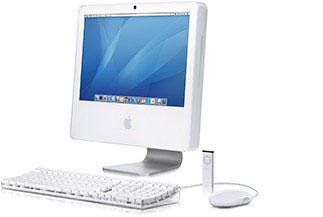
Why is this a big deal? Well there are many reasons, but for me, the top reason is that my Windows programs may soon be running on cool Apple hardware. Some people love Apple's operating system and some love their unique programs. I don't care about that stuff, I want one of those beautiful white iMac's on my desktop. White (like my iPod) and nothing under my desk. Nothing.

I last used an Apple desktop in college. The business school at my university had IBM units by the hundreds down in the basement. They ran WordStar and VisiCalc and some programming languages. Pretty blah.

One day someone turned me on to the fact that the architectural college had these computers called "Macintoshes" and they ran programs called "Word" and "Excel" and they were the BOMB. The gooey operating environment was something I'd never seen before. It had a mouse (there were no mouses to be found over at the business school.)

Those were the days. I bought my first Mac the month I graduated from college... I also received a PC for graduation. So without ever opening the boxes, I sold my first Mac to my brother-in-law. It was close to 20 years later before I bought another Apple product.

Although the Nano and the 30 gigabyte video iPod I bought recently are very cool, nothing has hit me more than the iMac. The 20 inch iMac is the coolest piece of computer hardware I've ever seen. Beautiful and functional. BIG yet a footprint that is INCREDIBLY small. I played with one of these last year in Chicago at the Apple Store on the Miracle Mile. I sat there forever staring at the screen and wondering "why can't Dell make something so functional and stylish."

If the new Windows operating system, which is called Vista, ever comes preloaded on the iMac... I'll buy it immediately.

From a business perspective, Apple stands to gain if others think like I do, they want their PC apps to run on Apple Hardware. I think the potential is huge for the consumer market, but what about the business market? Would large corporate clients invest in Apple iMacs? Perhaps. I can think of one company that might pull the trigger on a few thousand units - Disney - perhaps this will be Steve Jobs' first piece of business on the Disney board.

TK

Friday, March 17, 2006

John McCain Doesn't Do Technology?

This is a technology blog, not a political blog; however, I was reading an article in Fortune Magazine about how successful people work and John McCain was profiled.

Senator McCain made some statements regarding technology and I found his postions intersting considering the fact that he MAY be running for POTUS in 2008.

Check this out... in the article Senator McCain made the following statement regarding his use of technology:

"I read my e-mails, but I don't write any. I'm a Neanderthal--I don't even type. I do have rudimentary capabilities to call up some websites, like the New York Times online, that sort of stuff. No laptop. No PalmPilot. I prefer my schedule on notecards, which I keep in my jacket pocket. But my wife has enormous capability. Whenever I want something I ask her to do it. She's just a wizard. She even does my boarding passes--people can do that now. When we go to the movies, she gets the tickets ahead of time. It's incredible."

I have a few points I'd like to make on the senator's comments considering the world we live in today and the important role that technology plays in the military, business and in the everyday lives of the American people.

1. Communicating via email is a common event for most Americans. Whether it be from a business perspective or family life perspective. Email (and the Internet) have good and bad ramifications on the people of this country. Government leaders need to know how to use this technology to know what it's all about.

2. Everyone needs to know how to type. In today's world, saying "I don't even know how to type," is like saying "I don't know how to write." You can't say "I have people who do that for me" and then try and inspire a country to be on the cutting edge of education and technology.

3. The New York Times (online or offline) is biased news. Find a more objective source for news. Try Google News... that way you can get the best of both worlds.

4. No laptop - no Palm device. This possible presidential candidate prefers note cards. Mr. McCain would find it hard to function in the business world without "staff" to type and send his emails and track his appointments. Can you imagine a young person entering the workforce today saying "I don't type and I don't know how to use a laptop. I don't even have a Palm Pilot - but you should see my notecards!" Wow, I want that person to join my company...

5. Luckily for the country Mr. McCain's wife knows how to surf the Internet. Did you know that you can print a boarding pass for an airline flight and even buy movie tickets online? According to the senator, "It's incredible."

Incredible is right. I think this whole technology thing is catching on and we need to jump in and embrace typing and all of those other cutting edge skill sets. The way I see it, Mr. McCain has about 30 months to go buy "Mavis Beacon Teaches Typing" and head to his nearest New Horizons Computer Learning Center and take a few classes (go to www.newhorizons.com senator - or have a staff person do it.)

All fun aside... our young people need to know how to type, they need to know how to use technology (for the right and productive reasons), and they need leaders that set a positive example. To imply that you don't use technology and that it's okay, is a weak position. To brag about it, is just stupid.

What staffer approved that article?

My suggestion... read www.salestechnologyreport.com and have Mrs. McCain make the senator get his own dang movie tickets online. That would be "incredible!"

TK

Thursday, March 09, 2006

March Tech Review - eNook


I found this product in PC Magazine's December 2005 issue on "What's New for 2006." I thought it was a cool concept and design and wanted to review it this month.

Here's some of the copy from the advertising piece on eNook:

"A Gas Station for your Gadgets and a Work Space for You - it charges, it stores and it fits where you don't have a lot of room. It's called eNook, and it's a very multi-talented workspace. eNook has channels for you to plug in and charge all of your electronic gadgetry, like your laptop, cell phones, PDAs and digital cameras. Flip it up to store your laptop and lock it out of sight. Or flip it down and you have a handy desk."

That about says it all... except for the benefits of standing up while you work. I know two people who use this approach to managing their work day. I personally don't have a stand up desk, but when I have to make an important phone call, I stand up. When I want to convey energy and excitement, I stand up and when I want to put my best foot forward (the left one), I stand up.

According to the website, www.standupdesks.com (seriously), here are 3 good reasons to move to a stand up desk:

1. Working at a stand up desk brings immediate relief to lower back pain sufferers.

2. Stand up desks pay for themselves quickly with both increased and improved productivity.

3. Stand up desks will leave you far less fatigued at the end of the day as a result of improved circulation and exercise.

Beyond the benefits of standing up, this is a great product for managing your technology. As much as convergence is taking place with the devices we carry around to sell and do business, I bet most of us still have at least three pieces of technology (be it a mobile phone, smart phone, PDA, laptop, digital camera or MP3.) That's a lot of cords and a lot of recharging going on.

With the eNook you can manage all of your devices in one stable location - while you work. One of the best features of this product is that you can fold it up and lock it shut. If you have little ones running around at home (or the home office), or teenagers grabbing your charging cables for their iPod, this security feature of folding and locking is awesome.

The outer features can be customized with different laminates and trim to match your decor. Check it out at www.anthro.com/enook

TK

Friday, March 03, 2006

BlackBerry Signs Peace Accord


What can better than a half billion dollars buy you these days? Well if you make it $612.5 million dollars it can buy you peace (piece of mind) and settlement of a damaging PR nightmare.

RIM's failure to settle last March cost an additional $162 million dollars. Not a bad return on investment for 12 months for NTP. RIM was losing business, both large and small customers were leaving the service and potential new customers were holding their ground until a resolution was assured.

RIM is out a few bucks... but hey, they have a billion dollars in cash in the bank so they'll be okay. Sales will be picking up quick and their stock was up 14% today in after market trading. That's a big day.

Who else won today beside corporate and individual clients? All 435 members of US House of Representatives and 100 US Senators and their staffs. If the service was shut off these folks had a "free pass" which would have kept their service up and running. Sound good?

Not really. They would have been vilified in the press and rightly so - the world suffers and yet the US Congress gets a free pass? That wouldn't have gone over so good, and the argument that the BlackBerry was vital to the operation of our government is a bunch of bull. There was always the Treo...

Treo (PALM), is perhaps the only loser today. Their stock is down almost 4% in after market trading and the possibility of picking up BlackBerry clients will most likely subside.

Well it's all over now... in a week this will no longer be a story. The good news for everyone is that BlackBerry will hopefully continue to make their product smaller and add a few more key features such as voice activated dialing. Soon the 8700c will spread to other carriers and BlackBerry will have an even stronger position in the market.

Peace - Out.

TK

Wednesday, March 01, 2006

Who is Buying PDA's?


Remember when this was the bomb in personal technology? They called it a Personal Digital Assistant. The PDA would keep your calendar, contacts and tasks all on one handy little device. It really was a bomb, it literally blew up the growth of companies like Franklin-Covey that were selling paper planning solutions. People began switching from paper to PDA's. I didn't think I could survive a day without my Classic size, Monticello style, Burgandy leather binder from FC - but I did and I'm glad I did.

My first PDA was not a Palm-Pilot like the one above... it was an HP unit called an "IPAQ." I don't know what that stood for but it was pretty cool. It ran Windows software and included versions of Outlook, Word, Excel and played MP3's. It was pretty handy and I never went back to a paper system. Eventually my laptop became my primary source of planning and rather than using a PDA, I switched to a smart phone which I have used for the last 3 years.

Technology being what it is today I have to ask... who is buying PDA's? It makes no sense to carry a PDA and carry a mobile phone. Two devices instead of one means:

  • Two devices to lose
  • Two seperate power cords (I don't like cords...)
  • Two seperate power cords to lose (I really don't like to lose things)
  • Two devices to carry around
  • Etc.

That's a long lists compared to just carrying one device around that serves as your phone, calendar, address book and tracks your tasks.

The new Treo 700w (top of the line device) at Verizon Wireless runs $399 with a two year contract. A new Palm "LifeDrive" runs $449... there are more economical choices from Palm all the way down to the Z22 for 99 bucks. (Now with the Treo 700w you have an agreement that you have to enter into, but you'll have that same obligation with the mobile phone you have to carry in addition to a simple PDA.)

Go with the smart phone...

Who is buying PDA's? There are people who have special software for PDA's such as realtors who use the Palm to access MLS information and other necessary tasks, but why not use the Treo 650 and have the phone feature integrated into the device that does so much?

It may also be that those people you still see carrying around a day planner are moving slowly into technology and trying a PDA. One feature that a PDA or a smart phone really won't give you - that little check mark when you accomplish a task. There is nothing like taking a real pen (not a stylus) to paper and making that small downward flick followed by a long upward stroke. It just feels like success...

TK

Friday, February 24, 2006

BlackBerry Bull$#@&

After all of the hype, all of the pontification and all of the published stories the judge does nothing in the NTP vs. RIM case. Nothing.

Within five minutes of the news breaking RIM stock was up 10% and tech analysts were scratching their heads. The one outcome that couldn’t happen – happened. That is the judge that has been pushing both parties to settle their dispute came out with the BIG HAMMER and said, “settle your dispute, and I mean it this time.” What is up with that? He’s already said that and NTP has already won a judgment against RIM.

Maybe I’m way off base. I’m not an attorney and I didn't go to law school, but it seems that with all the hype leading up to today, that a concrete course of action should have been determined and enforced by now.

I believe all consumers (both large corporations and individual users) were expecting a definitive answer in this case. Communicating with a BlackBerry device is not only addictive, it’s a NECESSARY business tool. Forget the jokes about “crack” and "thumbs,” this little device is my computer when my laptop is not on or in reach.

It’s also my phone, calendar and insures I can find anyone, at any number, in my little world. I deserved an answer today and so did anyone else carrying a BlackBerry product. If the new Motorola Q was on the market I’d go buy it and dump this 8700c in a minute. When an answer to this case does come, do I have an hour of connectivity? 30 days? No one knows.

I’m ready to move on and I wouldn’t mind having the service turned off at this point. I’d have a story that I could tell all around the country “where were you when BlackBerry service was shut off?” After sharing war stories I could then turn to my new Motorola Q with mobile versions of Word, Excel, PowerPoint and Outlook, and listen to my favorite tunes in Windows Media 10 too.

I've done it before and I can do it again, as long is I can check, reply and send an email with one hand, I have to have that feature...

TK

BlackBerry Friday or Just Black Friday?


If you've ever watched the movie Ben-Hur there is this scene when Judah (played by Charleton Heston) and Messala (played by Stephen Boyd) are about to start the chariot race and they meet up just prior to the start.

These guys hate each other and someone isn't going to come out of the "circus" alive... as Messala passes by Judah Ben-Hur he gives him this evil look and says "today is the day Judah" and Judah stares back at him and says "yes, today is the day." I love that movie and that scene is awesome. (Ben-Hur is the winner of 11 Oscars.)

Anyway, "today is the day BlackBerry..." This could be a huge business story or absolutely much to do about nothing. No prediction here, but check out this link to read more about what is happening from CNET News:

http://news.com.com/BlackBerry+getting+squeezed/2009-1047_3-6042243.html?tag=nefd.lede

Nick Fletcher in our group has already changed his phone just in case something happens today. It's definitely a prudent move and I salute his vigilance. We will know more by the end of the day. Good luck all you BlackBerry people!

TK

Thursday, February 23, 2006

BIOPRO Product – Check it out


A good friend of mine was showing me his mobile phone at lunch today and it had this round gel looking thing on the back.

It turns out to be a flexible resin Mylar product that reduces the electromagnetic radiation emitted from mobile phones and other consumer electronic products.

Not sure how it works, but the link between mobile phone usage and brain cancer has been studied very closely and articles can be found all over the web.

If you’re concerned about this topic, check out the website at http://www.mybiopro.com/ to read more about this product and find links to some interesting articles.

TK

Wednesday, February 15, 2006

Jacksonville Technology Briefing

Here is a list of websites that were shared with everyone attending the Jacksonville Sales Technology Briefing held in conjunction with the Results Seminars Top Producer program:

Results Seminars
www.closemoresales.com
This is our official site that tells you where we are going with our events and what's happening in our group. Check it out!

Nightingale-Conant
www.nightingale.com
NC is THE name in the personal development industry. Check out their website and you'll discover an entire world that you didn't know existed... dedicated to improving your sales career and your life!

Bankrate.com
www.bankrate.com
Everyone who deals in interest rates and financing should bookmark this site! What is happening on a daily basis in interest rates is kept up to date for you by Bankrate.com.

Send Out Cards
www.sendoutcards.com
This is a cool site dedicated to helping you stay in touch with your clients. Pick the cards that you want to send and this group lets you customize the card and even sends it for you. This is a truly automated BUT personal process. You have to see it to believe it.

Stuffbak.com
www.stuffbak.com
This was our featured site. Stuffbak makes a label product that you can attach to all of your personal effects (keys, mobile phones, PDAs etc.) This is a no brainer. Buy these and put them on everything before you lose it and some nice person keeps it because they don't know who the heck you are!

Google
www.google.com
Have you heard of this company? Duh. Of course you have... but are you using:
Google Alerts?
Google Desktop?
Google News?
Google Gmail?
Google Earth?

Remember, it's all FREE and all capable of assisting you be more efficient.

Clearwire
www.clearwire.com
This is the group here in Jacksonville that sells Wi-Fi access throughout the city.

Metro Free
www.metrofreefi.com
This is the website that lists different locations in Jacksonville that offer FREE access to Wi-Fi.

Broadband Access in JAX:
Verizon
www.verizonwireless.com
Sprint/Nextel
www.sprint.com
TMobile
www.tmobile.com

Laptop with Broadband and Wi-Fi Built in...
www.sony.com

Corex Card Scan
www.corex.com
This is the cool business card scanning product that can scan cards directly into your Outlook or other contact management software. You can type in 100 calls in 4 hours or scan them in 10 minutes. You pick!

Start Your Own Blog
www.blogger.com
Good for staying in touch with clients and getting your presence on the Internet. Remember - this one is FREE.

Remember... 5 things in 72 hours!

TK

Tuesday, February 07, 2006

Tech Etiquette 101

I am no Emily Post, but someone needs to lay down the law on what is cool and NOT cool when it comes to using technology and conducting business at the same time.

With so many "gadgets" flooding the marketplace, and with many of us carrying multiple devices (I count four on my desk and in my bag at this moment), the line between what is acceptable business behavior and poor business behavior has blurred a bit. From a selling perspective, I have a few ideas for using technology while doing business. Check it out:

Mobile Phones
It all started with mobile phones... pagers were not that bad, all you could do was look at an incoming number and pretend like you were Jack Bauer (the president is calling, terrorists have taken over the lunch room and drank someone's Mountain Dew, can you come take them out, maybe torture them a little bit so they won't go in the fridge again.)

When mobile phones saturated the marketplace, not only could you look at a number, but you could even answer the phone and tell the caller you were in an important meeting and you needed to call them back. (You'd never answer your phone during an important meeting would you? Yes you would. It happens everyday in business.)

Here is my advice... never bring your phone to an initial contact opportunity, presentation, final closing or any other important meeting. DO NOT HAVE YOUR PHONE ON YOUR PERSON. Notice I did not say put your phone on vibrate, stun, quiet mode or even turn it off. Do not bring it with you period. Your presentation is the most important thing you could be doing. Don't risk diminishing your message by having a phone ring or vibrate.

Never look at a ringing, vibrating mobile phone when presenting or in a meeting. If it does ring, turn it off but don't look at the incoming call number! If it does vibrate, ignore it all together.

If you really want to make points with a client or friend and have forgotten to NOT bring your phone to a meeting, take it out and turn it off in front of them and throw it in your bag, briefcase or purse and tell them "this is important and I am going to turn off my phone so it doesn't bother us. Nice touch.

Refrain from engaging in important conversations when driving for the same reason. If you are concentrating on driving then you cannot concentrate on the important points of selling. Casual calls are fine (if your state has no laws against using mobile phones while driving), but important calls are not cool. Try this the next time someone calls you or calls you back and it's important:

"Ron, this is really important and I can't give you the attention you deserve because I'm not at the office yet. Let me pull over and I'll call you right back and we can cover everything." Again, nice touch. I don't risk ramming the car in front of me, I get to focus on my client or future client and as a bonus, I just projected an image of responsibility and caring to the other party. Try it.

As a side note, don't carry on long-term conversations on your mobile phone in waiting rooms (doctors, dentists etc) or waiting in lines (banks Taco Bell etc), no one cares about your idle conversations. Take the call, do your business and order your Chulupas... life moves on.


Laptops
I have two computers in my office. A desktop that I do heavy work on and a laptop that I travel with and use for email and to write with. Everyday I have someone walk in my office while I am typing and there is always a slight delay before I look up and acknowledge them. Depending on who it is and what they want, I may not even look up and just continue to hammer the keys... not good.

Always close your laptop when talking with someone who is not on their own laptop, i.e. someone walks into your office and interrupts you. It shows respect for the person and their issue. You don't have to close it all the way, by just shutting it enough where you can't see the screen you can now focus and project that you are interested in the conversation.

Email
Don't put anything in writing that you don't want others to see... anything. Don't use ALL CAPITAL LETTERS and don't use all lower case letters. I think this whole email thing has caught on as a major business form of communication, so use correct grammar. (Save lower case, abbreviations and "code" such as LOL - whatever that means, for Instant Messaging where almost anything is acceptable.) LOL.

A major issue in our company is getting people to respond to email. Since email is almost like a conversation, always repsond to insure that both parties know where the "conversation" stands. For example, if I say "I'll meet you tomorrow morning at 8:30am" and you don't reply. How do I know you read the message? Always respond: "Got it" "I'll be there" "okay" etc. Don't over do it, just do it!

Text Messaging and Instant Messaging
No need to use proper grammar when sending text messages or instant messages. Fire away and do it quick! Be smart when using text messaging in a business setting. Don't digress 20 years and think your passing notes in chemistry class, remember, don't say anything in a text message that you don't want someone else to see. Like email, text messages can be forwarded to other people, printed or saved for a later date. You don't want to be forced to decline your party's presidential nomination because you asked Sally in the next cubicle something stupid while sending a text message. STAY FOCUSED ON BUSINESS.

"CET" Overload
This one is for all you Treo and BlackBerry users out there... I coined the phrase "CET" for Call, Email or Text. Refrain from "CET'ing" during important activities, such as initial contact, presentation, final closing, at the dinner table, in church or while ordering your Tall, Decaf Mochachino. There are so many options on your device that you might forget that the world continues to spin while your thumbs are moving a mile a minute. Snap out of it! Business and life will happen without you weighing in on every issue and event so chill out. As Jim Rohn says "where ever you are - be there."

Here's a toast to a new you and I hope some of these ideas help you manage the onslaught of technology while you do business and just try to live. Now if your phone is attached to your head and you have to make a call everytime you get in your car, go see a professional, words alone will not cure you.

TK