Tuesday, January 02, 2007

2007 - The Year of Email

I really think this whole email thing is catching on... 2007 is definitely the year in which proper grammar and usage will be the norm with email communication.

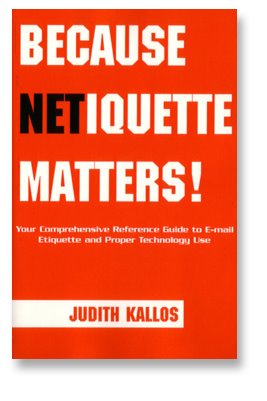
Judith Kallos is my source for online etiquette. You can check out her blog at NetMannersBlog.com and read her yourself. I've mentioned her before and I'll use her creative talent again - read her and buy her book on the subject of online etiquette. She has 10 resolutions for the new year on how to use email more professionally. I pass them on to you and as always... take the best and leave the rest!

1. I will not forward an e-mail unless it specifically applies to the person I am sending to. I will include a personal note to that person so they know why I am forwarding that particular e-mail their way. If I must send or forward the same e-mail to a group of contacts, I will do so only when I put their e-mail addresses in the BCc: field to protect their privacy (especially if they don't know each other).

I will also set a good example by removing any visible e-mail addresses within the body of the forward from previous irresponsible forwarders who did not feel the need to protect their contact's privacy. I will also make a point of down editing my e-mails to remove text that is irrelevant to the ongoing conversation.

2. I will take the time to make sure that my sentences are complete, capitalized and include proper punctuation. Using proper sentence structure and taking the extra time to ensure that my intent and tone are clear, will do nothing but reflect positively on me. Making these efforts will go a long way to ensuring communicating with me is easy while having the added benefit of helping to avoid any misunderstandings.

3. I will not send an unannounced large attachment of any kind, even the ones I think are very special photos of [insert here: my grand baby, my new car, sales flyer, Power Point presentation...], until I ask first when would be the best time to send it to the intended party. This way, I do not fill their e-mail box without notice causing all their other e-mail to bounce. The fact is I do not know what the other side's e-mail activity is like to assume my attachment will not cause any unnecessary problems for them. Think of the other side, not just of what you want to do.

4. I will ensure that the Subject: field will include a brief and concise description of the content of every e-mail I send. I will modify or change the Subject: field when necessary to better display what my e-mail contains.

5. Every e-mail I send will be courteous and include a proper greeting and closing which includes my name. Typed properly too! Names in small case or all caps reflect either a lack of education or tech savvy; neither of which is a good thing. Nice greetings and closings avoid my e-mails coming off as demanding or terse and reflect that I understand common courtesies.

6. I will not copy or use any text, graphics or content from another Web site or author without their explicit permission to do so. The online world, contrary to popular belief, is not a public domain environment! I will not use another author's writings in whole or in part without them being aware of exactly what I am doing and where I will use their information. I will not post e-mails that were sent to me privately for any reason in a public forum without the original sender's permission. These are all serious copyright and privacy issues that I need to be aware of, practice and respect.

This is why I site Judith's work and don't just cut and paste...

7. I will be very respectful about how I use my employer's technology resources understanding they are paying the bills and I am on their time. I also understand that I should not assume any level of privacy while using company equipment, connectivity or e-mail resources. I will make a point of reviewing my employer's policies so that I am familiar with them so I can avoid any future problems.

8. I will refrain from formatting my e-mails with colored text, bolding and/or italics because I know it may not look as I intended when received on the other side. I also understand by making the extra effort to add emphasis with formatting, it may be taken the wrong way or even over-emphasized by the recipient. I will learn to relay my thoughts clearly with the written word rather than having to rely on formatting. I understand if I take the time to choose my words carefully and reflect on how I use them, formatting is not necessary.

9. When I sign up for a Web site service, newsletter or am sending an inquiry, I will take the time to add that site's e-mail address to my address book, white list or approved senders list so that the response can get through any spam blocking software my ISP, online service or that I may have in place. I understand that if I don't make this effort, the response to my request or subscription may not make it to my inbox.

10. I will make a point of understanding each online service or Web site I choose to use by reading their Frequently Asked Questions, Terms of Service and Help area. I understand that I need to eliminate my actions or lack thereof as a possible cause of a perceived problem before pointing fingers at others. If in fact something does appear amiss, I will e-mail with courtesy asking for assistance in resolving my difficulties rather than making blunt demands or accusations based on my assumptions alone.

Good advice from someone who studies this stuff all day. Let's commit to make 2007 the year of the email - and make yourself look better with your online communications.

TK

Saturday, December 30, 2006

Google - Master of the Universe

Google is taking over the world and soon the universe. At closing Friday the stock sat at about $460 a share. It's high for the year was $513 so it's "down" a little... bummer.

I'll take that bummer any year. If you just sat on it all year then you're up about thirty bucks from January 1, 2006, but there was a lot of money to be made in this stock. The 52 week low was $331.55 so there was quite a bit of movement.

What I like most about Google is not it's stock price (because I don't own it), but the products they are putting out and the products they are making better. The site I use for all of my blogs, blogger.com is a Google product. My back up email (tomkauffman@gmail.com) is also a Google product.

Google is all over my computer starting on the desktop. Google Desktop keeps me on time, tracks my stocks and the market, gives me the weather report for four cities I'm tracking all the time, tells me how strong my Wi-Fi signal is and how much battery power I have left. It also searches for any document on my computer.

I use Google as my search engine. I also use Google Earth, Google Finance, Google Images (for my blog posts), Google Alerts and Google Mail.

Other great products introduced this year were Google Calendar and Google Docs & Spreadsheets. Each allows you to do your work anywhere you can get an Internet connection.

This company is worth 141 billion dollars and have billions in cash to invest in new ideas and new companies. Look for more great things from Google in 2007.

TK

Wednesday, December 27, 2006

E-mail Etiquette Matters!: Stay Away from Sarcasm in E-mail

I've received my share of nasty emails over the years and have made an art of crafting them! (That means so nasty from my end, recipients don't even get that I'm slamming them. I don't recommend it.

However, one of the worst things you can do is write an email laced with sarcasm. Judith Kallos writes about email etiquette and she posted this article on the topic of sarcasm in email on her blog. Check it out:

E-mail Etiquette Matters!: Stay Away from Sarcasm in E-mail

The challenge using sarcasm in spontaneous writing (such as email), is that it is not easily detected. The written word is void of tone, gesture and a quick opportunity to add clarifying comments.

"Say" something wrong in an email and you may have an upset recipient for a longer period of time than you'd like. There are symbols such as :) or ;) that aid in disarming sarcasm, but they don't appear to be very professional to me.

My advice - skip the sarcasm is business related email and use it sparingly in all other email correspondence.

TK

Thursday, December 21, 2006

Cool Stuff Every Salesperson Should Own

As the holidays come into full swing I have been thinking of the key pieces of equipment every salesperson should own. Of course "key" denotes you've got to have it to do business and that would be impossible. So by switching to the word "cool" everyone has permission to own these things even if only for their own personal pleasure! Here's the list:

1. Smart Phone - Yes this implies your other phone is dumb. If you can't retrieve email from multiple accounts and hit the web for critical information you need a new phone! A smart phone should feel like a little computer in your hand that doesn't have to be booted up an powered down. This includes your calendar, contacts, tasks and various notes. Get this first!

2. iPod - This device may be the coolest piece of technology you ever own. There are multiple models that serve multiple purposes. I own three and use two heavily. The other one was swiped by my middle son (who's getting one for Christmas so I can get my Nano back.)

The iPod is more than just a music player. I use my iPod to listen to daily podcasts on business, finance and politics. No matter what industry you're in... there's a podcast that can help you become more informed and more proficient at what you do. In addition, my entire personal development library is housed on my 30 gig video iPod. I can listen to the icon's of personal development for days without hearing the same message twice. If you don't have one - get one!

3. Headset - I just wrote an article on a new wireless headset (the Samsung WEP200 that I am still impressed with) and am recommending any type of headset for any phone that you use on a daily basis. Work, mobile and even your home phone. See how much freedom you can feel by removing the handset from the side of your head! Who can you trust? Plantronics is the most trusted name in headsets. Go with them and you won't get ripped off.

4. Small Digital Camera - Snapping pictures and throwing up pictures on your website, blog or just having them on your computer is a worthwhile thing.

5. High Capacity Storage Device - If you've ever lost your data then you know how painful an episode it can be... BACK UP YOUR DATA. There are devices the size of a deck of cards that can back up your entire computer. Get one and use it weekly.

Well that's five things. Number five may not be cool but it is essential. Merry Christmas!

TK

Tuesday, December 19, 2006

Giving Bluetooth Another Shot...

I've tried Bluetooth headsets in the past and like many users haven't been impressed - so I tossed the Jabra piece of junk I had and gave up... it was like throwing away a hundred dollar bill.

I haven't had a wireless headset since, even though the world continues to buy them and the army of "mobile phone cyborgs" grow and grow and grow in number!

This all came to an end today when my Samsung WEP200 arrived in the mail and I took it for a spin. up. This little jewel is the most compact wireless headset I've ever seen... it's one of the entries in a new slew of supercompact headsets hitting the market.

This little baby measures only 1.5 by 0.5 by 0.5 inches (translation - it's really tiny), and fits perfectly in the ear canal. Easy buttons located in just the right positions. The unit comes with an equally small carrying case which also serves as the charging unit. I like the setup because when the unit is charging it is totally protected, but don't lose it - without the case the headset cannot be charged and I don't care how long the talk time is (4 hours by the way) or the standby time is (3 days)... without the charging unit you are toast.

I would rank the call quality as high and the way this unit works with my BlackBerry 8703e from Sprint can only be described as "harmonious." Sure they are both jet black and look like a match made in heaven, but add to that the ease in which I can answer calls and end calls without ever taking my phone out of it's holster - that's... harmonious too!

Getting excited about a wireless headset device may make me appear like I'm a technology neophyte - well I'm not - this little unit has me back in the Bluetooth headset game because it works and all of the manufacturers out there are building better products. Best of all... I look like a Navy Seal instead of a Terminator/cyborg wanna-be.

You'll like the look, the feel and the sound of the Samsung WEP200.

TK

Tuesday, December 12, 2006

Wired Magazine's Best

Wired Magazine is a great publication if you like to look at magazine covers. For me it's kind of like album art. You may not have any interest in the music but the cover can generate a lot of emotion.

The best thing I've seen from Wired in some time is it's 2007 "Test Wired" edition which is on news stands now. Wired has tested and rated over 300 products... Laptops, mobile phones, home audio, cameras, satellite radio, MP3 players and many more products.

Also in this issue is a list of the top 10 gadgets that changed the world. Number One... the RCA 630TS which arrived in 1946. Guess what it is? Television. The price in today's dollars would be $3,600 bucks! Where's the record player, I'll use that for a few decades and let the Japanese get their electronics juggernaut going.

I think the iPod should be on the list but not a single Apple product is listed. IBM gets the number 9 spot for it's 5150 personal computer.

There's also a great piece on how to pick a mobile phone service provider (page 043), and the winner is... Verizon!

This is a must have read if you're into technology so grab an issue before they are all gone.

TK

Sunday, December 03, 2006

BlackBerry Pearl is a Bit Thin

The BlackBerry team has delivered a very thin product with its new Pearl... too thin for my liking. I recently checked it out at Cingular Wireless and I don't know that it is capable of handling the rough work of business. It's pretty delicate unit.

BlackBerry ships the phone without any type of carrying case to protect it and the shiny outer appearance is bound to get wasted within a few weeks. I'm sure aftermarket products are already available and more on the way.

I currently use an 8700g and I love it. The major challenge other than the size of the unit and its delicate appearance is the keyboard layout. Without a full size QWERTY keyboard I can't imagine this unit being the workhorse BlackBerry fans are used to hammering away at.

The Pearl loses the scroll wheel and uses a "joystick" to maneuver through its menus. It's a little awkward but I'm sure the feel for it comes quickly. It comes with a camera and an MP3 player, but that's not why I choose BlackBerry products. Leave the fluff to Treo et al.

Check out the Pearl at a Cingular store near you.

TK

Thursday, November 16, 2006

My Product Advisor...

Surfing for the greatest technology innovations in the marketplace (in a single bound), led me to review a site called My Product Advisor.

The website allows you to pick a general product category, answer questions regarding usage and features that are important to you, then receive recommendations on products that fit your needs.
According to Smartphone and Pocket PC Magazine, My Product Advisor "offers a great interactive guide to help you choose a PDA. It lets you state your preferences in seven different categories, and then makes a recommendation. In each category you indicate the importance of a particular feature via sliding scales."
Once recommendations are made you can view the products that fit your specifications and review prices via Price Grabber.
Check it out.
TK

Tuesday, November 07, 2006

Spokane Technology Briefing

Thanks to everyone who attended our Sales Technology Briefing in the Inland Northwest (held in conjunction with our Becoming a Top Producer seminar) at the Coeur d' Alene Resort.

Here is a list of the products, services and websites that we reviewed during our event:

Results Seminars
www.closemoresales.com
This is our official site that tells you where we are going with our events and what's happening in our group. Check it out!

Selling Power Magazine
www.sellingpower.com
Selling Power is THE magazine for sales professionals. If you don't subscribe to this magazine then you are missing out on a major tool of the selling industry.

Bankrate.com
www.bankrate.com
Everyone who deals in financing should bookmark this site! What is happening on a daily basis in interest rates is kept up to date for you by Bankrate.com.

Send Out Cards
www.sendoutcards.com
This is a cool site dedicated to helping you stay in touch with your clients. Pick the cards that you want to send and this group lets you customize the greeting and even sends it for you. This is a truly automated BUT personal process. You have to see it to believe it.

Stuffbak.com
www.stuffbak.com
This was our other featured site. Stuffbak makes a label product that you can attach to all of your personal effects (keys, mobile phones, PDAs etc.) This is a no brainer. Buy these and put them on everything before you lose it and some nice person keeps it because they don't know who the heck you are!

Super Hero Cards (Bonus Site)
www.superherocards.com
We didn't cover this site but it reall is a cool idea. This product that takes a picture of you and turns it into a Super Hero "playing card." This is definitely for the "fun" type of sales person who is looking to distinguish themselves from their competition.

Google
www.google.com
Have you heard of this company? Duh. Of course you have... but are you using: Google Alerts?Google Desktop? Google News? Google Gmail? Google Earth? Google Calendar? Remember, it's all FREE and all capable of assisting you be more efficient.

Anchor Free
www.anchorfree.com
This is the website that lists different locations in the Phoenix area (and around the country) that offer FREE access to Wi-Fi.

Broadband Access:
Verizonwww.verizonwireless.com
Sprint/Nextelwww.sprint.com
TMobilewww.t-mobile.com

Business Card Scanning Product
www.cardscan.com
This is the cool business card scanning product that can scan cards directly into your Outlook or other contact management software. You can type in 100 calls in 4 hours or scan them in 10 minutes. You pick! Check eBay for the best price on this product.

Start Your Own Blog (Bonus Site)
www.blogger.com
We didn't cover this site either, but blogging is HUGE and is good for staying in touch with clients and getting your presence on the Internet. Remember - this one is FREE.

Remember... 5 things in 72 hours... just pick one and DO IT!

TK

Thursday, November 02, 2006

Email... Reply Please!

One of my favorite blogs to read on a weekly basis is written by Judith Kallos called "Because Netiquette Matters!" - check it out and you'll pick up great ideas on technology etiquette (it's a book too.) Some of my best received speaking content is based on the ideas generated by Judith... she just makes sense!

Email etiquette is critical to communicating in today's selling environment. Every interaction with a client is an opportunity to make a positive impression or a negative impression. What I find is that what may be a minor issue to you or I can be a major issue to someone else. I occasionally become frustrated when emails that I have sent to team members or clients are not responded to in a timely manner - or at all.

You see to me, intuitively, communicating via email is just like having a conversation, and I cannot imagine having someone not answer or respond during a face to face interaction. Similarly, I can't imagine ending a conversation without the courtesy of an "okay," "got it," "sure thing" or "talk to you later." Check these people out... let's assume they are talking about business or perhaps they are talking about something personal at a business function - you pick the topic. Can you just imagine one of them making a statement similar to this... "hey that sounds great Michael, I'll meet you at 8am" and Michael just staring at the other person, suddenly turns and walks away. Bizarre right?

You bet. If that happened you'd be wondering... "did he hear what I said" or perhaps you'd just think the person was not really interested in meeting you at 8am. Either way, you are left wondering where things stand.

Here's the point... that happens every day with email. Here are some examples:

1. You receive an email on a new company product offering and a training meeting to cover the details that is scheduled for next Thursday. Do you respond?

2. A client replies via email to an order stating "this looks good, let's move forward." Do you respond?

3. Your manager emails you the time and place of your upcoming quarterly review. Do you respond?

The answer to each question is absolutely you respond! Here's the test - instead seeing these as email messages, picture the interaction as face-to-face. Would you respond now? Of course.

Remember in selling it's not what you think is inappropriate, it's what your client or perhaps your manager thinks is appropriate that counts! Reply to all the emails you get and ask for others to do the same.

TK

Wednesday, October 25, 2006

Phoenix Technology Briefing

Thanks to everyone who attended our Sales Technology Briefing in Phoenix (held in conjunction with our Becoming a Top Producer seminar.) Here is a list of the products, services and websites that we reviewed during our event:

Results Seminars
www.closemoresales.com
This is our official site that tells you where we are going with our events and what's happening in our group. Check it out!

Selling Power Magazine
www.sellingpower.com
Selling Power is THE magazine for sales professionals. If you don't subscribe to this magazine then you are missing out on a major tool of the selling industry.

Bankrate.com
www.bankrate.com
Everyone who deals in financing should bookmark this site! What is happening on a daily basis in interest rates is kept up to date for you by Bankrate.com.

Send Out Cards
www.sendoutcards.com
This is a cool site dedicated to helping you stay in touch with your clients. Pick the cards that you want to send and this group lets you customize the greeting and even sends it for you. This is a truly automated BUT personal process. You have to see it to believe it.

Stuffbak.com
www.stuffbak.com
This was our other featured site. Stuffbak makes a label product that you can attach to all of your personal effects (keys, mobile phones, PDAs etc.) This is a no brainer. Buy these and put them on everything before you lose it and some nice person keeps it because they don't know who the heck you are!

Super Hero Cards (Bonus Site)
www.superherocards.com
This is the site that takes a picture of you and turns it into a Super Hero "playing card." This is definitely for the "fun" type of sales person who is looking to distinguish themselves from their competition.

Google
www.google.com
Have you heard of this company? Duh. Of course you have... but are you using: Google Alerts?Google Desktop? Google News? Google Gmail? Google Earth? Google Calendar? Remember, it's all FREE and all capable of assisting you be more efficient.

Anchor Free
www.anchorfree.com
This is the website that lists different locations in the Phoenix area (and around the country) that offer FREE access to Wi-Fi.

Broadband Access:
Verizon
www.verizonwireless.com
Sprint/Nextel
www.sprint.com
TMobile
www.t-mobile.com

Business Card Scanning Product
www.cardscan.com
This is the cool business card scanning product that can scan cards directly into your Outlook or other contact management software. You can type in 100 calls in 4 hours or scan them in 10 minutes. You pick! Check eBay for the best price on this product.

Start Your Own Blog (Bonus Site)
www.blogger.com
Good for staying in touch with clients and getting your presence on the Internet. Remember - this one is FREE.

Remember... 5 things in 72 hours... just pick one and DO IT!

TK

Monday, October 16, 2006

New Treo 680 - Finally Loses the Antenna!

Palm is about to roll out a new Treo (the 4th new model this year), The Treo 680, that finally loses that annoying stub of an antenna! Check this photo out... it's not cut off at the top - the stub is gone and from an esthetics perspective, I think this phone just elevated to an entirely different level!

Supposedly the 680 will sell for a mere $199... so something must be missing, besides the antenna. You don't cut the price of your new phone by close to 50% unless you cut something else too - at minimum your margin! Maybe the 680 is tasked with creating so much volume that the retail price cut won't make a difference? That's exactly the plan... Palm is cutting costs in its operations to make up for the diminished revenue. Palm plans to use two Chinese manufacturing companies to produce Treo models hoping to negotiate better deals on production costs.

Creating a Treo that targets the consumer market rather than the business market is a smart move too, considering the fact that the business market for smart phones is only 25% of the total non-business market. Palm is relying on the "we'll make it up in volume" strategy.

Lose the stubby antenna and make the body of the phone some cool colors and show teenagers how they can get their email on their phone... WINNING COMBINATION.

Palm needs the boost too since their stock is down more than 30% since April and since it won't take long for Palms original market, hand-held organizers will be totally dead. I don't know of one forward thinking individual who is buying a PDA and a mobile phone. It just doesn't make sense.

I think this phone is a winner and it might be my next purchase - lookout BlackBerry.

TK

Tuesday, October 10, 2006

Salt Lake Technology Briefing

Thanks to everyone who attended our Sales Technology Briefing in Salt Lake City (held in conjunction with our Becoming a Top Producer seminar.) Here is a list of the products, services and websites that we reviewed during our event:

Results Seminars
www.closemoresales.com
This is our official site that tells you where we are going with our events and what's happening in our group. Check it out!

Selling Power Magazine
www.sellingpower.com
Selling Power is THE magazine for sales professionals. If you don't subscribe to this magazine then you are missing out on a major tool of the selling industry.

Bankrate.com
www.bankrate.com
Everyone who deals in financing should bookmark this site! What is happening on a daily basis in interest rates is kept up to date for you by Bankrate.com.

Send Out Cards
www.sendoutcards.com
This is a cool site dedicated to helping you stay in touch with your clients. Pick the cards that you want to send and this group lets you customize the greeting and even sends it for you. This is a truly automated BUT personal process. You have to see it to believe it.

Stuffbak.com
www.stuffbak.com
This was our other featured site. Stuffbak makes a label product that you can attach to all of your personal effects (keys, mobile phones, PDAs etc.) This is a no brainer. Buy these and put them on everything before you lose it and some nice person keeps it because they don't know who the heck you are!

Super Hero Cards (Bonus Site)
www.superherocards.com
This is the site that takes a picture of you and turns it into a Super Hero "playing card." This is definitely for the "fun" type of sales person who is looking to distinguish themselves from their competition.

Google
www.google.com
Have you heard of this company? Duh. Of course you have... but are you using: Google Alerts?Google Desktop? Google News? Google Gmail? Google Earth? Google Calendar? Remember, it's all FREE and all capable of assisting you be more efficient.

Anchor Free
www.anchorfree.com
This is the website that lists different locations in Salt Lake and beyond (and around the country) that offer FREE access to Wi-Fi.

Broadband Access:
Verizon www.verizonwireless.com
Sprint/Nextel www.sprint.com
TMobile www.tmobile.com

Business Card Scanning Product
www.cardscan.com
This is the cool business card scanning product that can scan cards directly into your Outlook or other contact management software. You can type in 100 calls in 4 hours or scan them in 10 minutes. You pick! Check eBay for the best price on this product.

Start Your Own Blog (Bonus Site)
www.blogger.com
Good for staying in touch with clients and getting your presence on the Internet. Remember - this one is FREE.

Remember... 5 things in 72 hours... just pick one and DO IT!

TK

Tuesday, October 03, 2006

Mobile Phone Maniacs

When is the last time you saw and heard someone talking on their mobile phone that was being rude? Yesterday? Today? A minute ago?

Rudeness is on the the rise according to a survey by the Pew Research Center... 86% of respondents have said that they are occasionally irritated by other people conducting "loud and annoying" mobile phone conversations. This survey, and a 2004 survey done by Sprint, imply that those saying they see and hear rude mobile phone talkers don't believe they themselves are rude when they use their own mobile phones.

Hmmm. Doesn't seem to make sense. Obviously we mobile phone users think we're courteous when we're talking on the phone and most everyone else is rude and disruptive.

Where's the truth?

The truth is we all have a little bit of a mobile phone maniac in us. To purge the maniac in you, stop doing these three things immediately.

1. Stop making calls, and only take important calls, on your mobile phone when you are in a restaurant, using public transportation or in a non-private office setting.

Too many times when we're waiting for someone to join us for lunch or dinner we grab our phone and call someone, anyone. Just give us something to do instead of making us wait, alone, in a restaurant, alone. Try this instead of making a phone call - look at the menu. Ask for crayons if you have to but give the phone and everyone around you a break.

2. Stop having private phone calls in public settings. No one cares about your personal business, but that doesn't imply they want to hear it. Walking through the mall talking about inappropriate topics isn't okay just because no one knows who you are in the mall.

3. Stop using "I'm multi-tasking" as an excuse for being rude when interacting with a human being and technology at the same time. Here's a simple rule of thumb - the human comes first! Multi-tasking when you are working alone may be a good thing... but the topic is debatable. There is no debate when you are talking with someone face to face and you suddenly just grab your phone and start talking to the person one the other end of the phone. That's called being rude.

Try these three things. The noise level in the universe will decline greatly and you can purge yourself of some poor behavior at the same time!

TK

Wednesday, September 27, 2006

Business Podcasts

Are you listening to podcasts? If you're not, I'm not surprised. Here's another question - are you recording television shows using TiVo or a similar DVR device? I bet that you are or soon will be.

Podcasts are like recording television programs to TiVo... except that they are automatically recorded and posted to a website for you to download when you want them. Even better, you can use a subscription service like iTunes and even the downloading can be automatic.

The best part? You get to listen to your content when and where you want. Listen on your desktop, laptop or sync your MP3 Player and take the content anywhere you want to go.

Two of my favorite business podcasts are...

1. Buzz Out Loud - Great podcast on technology and what's happening in the business technology world. Always informative and always fun.

2. Meet the Press - That's right, Meet the Press. If you know what's happening in politics then you'll have a better perspective about what's happening in business.

There are great podcasts on a variety of topics that can keep you informed on current business issues and especially technology issues. Best source in my book - check out iTunes.

TK

Sunday, September 03, 2006

The Case for Smart Phones

In my sales technology seminars I focus a major portion of my presentation on making the case for owning a smart phone as opposed to a regular mobile phone.

The essence is on being more efficient as a sales professional and using a smart phone to help you do it. If you're doing all the right things in selling, and you become more efficient, you should close more sales. Pretty logical.

The Treo is only one example of a smart phone. There are different models of the Treo and there are many other manufacturers. BlackBerry is an example. The fact is that for business professionals, especially sales professionals having all of the information that a smart phone instantly provides is a huge advantage if used for the right purposes. Here's a few great ways to maximize your efficiency with a smart phone:

1. A smart phone is like having a computer in the palm (no endorsement here) of your hand only better. First of all, it powers on INSTANTLY and off INSTANTLY. There is no "boot up" process with a mobile phone. Like a computer it can run contact programs like Outlook along with other programs such as Word, Excel and PowerPoint. It really is a computer in the palm (no endorsement here) of your hand.

2. With the access provided by your mobile carrier your phone is also connected to send and receive email. A realtor I met in Chicago told me about a sale she made that paid her $15,500 in commission. How did she do it? She did what she normally does, got the listing, provided great service and made the sale. How did she get the listing? She answered an email within seconds on her smart phone. When the client received an instant response, they gave the listing to her just as quickly. If she had checked her email the next day, or a few days later, someone else would have got the listing because it was a quick move.

3. Back to number one... Because you have Word or similar programs on your smart phone you can instantly email clients sales related documents. Marketing pieces or contracts can be on clients computer in minutes.

4. Web access is possible on every smart phone out there. The key is to use it to be efficient and not just screw around. Driving directions would be a great example of productive usage.

5. Some devices have all the bells and whistles and I believe that the same rules of efficiency apply. If you have a digital camera or a video camera on your phone use it for business to get more done.

In a few years one out of every four phones in America will be a smart phone and sales professionals should be carrying the majority of them.

TK

Sunday, August 20, 2006

Riverside Technology Briefing Notes

Thanks to everyone who attended our Sales Technology Briefing in Riversdie (held in conjunction with our Becoming a Top Producer seminar.) Here is a list of the products, services and websites that we reviewed during our event:

Results Seminars
www.closemoresales.com
This is our official site that tells you where we are going with our events and what's happening in our group. Check it out!

Selling Power Magazine
www.sellingpower.com
Selling Power is THE magazine for sales professionals. If you don't subscribe to this magazine then you are missing out on a major tool of the selling industry.

Bankrate.com
www.bankrate.com
Everyone who deals in financing should bookmark this site! What is happening on a daily basis in interest rates is kept up to date for you by Bankrate.com.

Send Out Cards
www.sendoutcards.com
This is a cool site dedicated to helping you stay in touch with your clients. Pick the cards that you want to send and this group lets you customize the greeting and even sends it for you. This is a truly automated BUT personal process. You have to see it to believe it.

Stuffbak.com
www.stuffbak.com
This was our other featured site. Stuffbak makes a label product that you can attach to all of your personal effects (keys, mobile phones, PDAs etc.) This is a no brainer. Buy these and put them on everything before you lose it and some nice person keeps it because they don't know who the heck you are!

Super Hero Cards (Bonus Site)
www.superherocards.com
This is the site that takes a picture of you and turns it into a Super Hero "playing card." This is definitely for the "fun" type of sales person who is looking to distinguish themselves from their competition.

Google
www.google.com
Have you heard of this company? Duh. Of course you have... but are you using: Google Alerts?Google Desktop? Google News? Google Gmail? Google Earth? Google Calendar? Remember, it's all FREE and all capable of assisting you be more efficient.

Anchor Free
www.anchorfree.com
This is the website that lists different locations in the Inland Empire (and around the country) that offer FREE access to Wi-Fi.

Broadband Access:
Verizon www.verizonwireless.com
Sprint/Nextel www.sprint.com
TMobile www.tmobile.com

Business Card Scanning Product
www.cardscan.com
This is the cool business card scanning product that can scan cards directly into your Outlook or other contact management software. You can type in 100 calls in 4 hours or scan them in 10 minutes. You pick! Check eBay for the best price on this product.

Start Your Own Blog (Bonus Site)
www.blogger.com
Good for staying in touch with clients and getting your presence on the Internet. Remember - this one is FREE.

Remember... 5 things in 72 hours!

TK

Chicago Technology Briefing Notes

Thanks to everyone who attended our Sales Technology Briefing in Chicago (held in conjunction with our Becoming a Top Producer seminar.) Here is a list of the products, services and websites that we reviewed during our event:

Results Seminars
www.closemoresales.com
This is our official site that tells you where we are going with our events and what's happening in our group. Check it out!

Selling Power Magazine
www.sellingpower.com
Selling Power is THE magazine for sales professionals. If you don't subscribe to this magazine then you are missing out on a major tool of the selling industry.

Bankrate.com
www.bankrate.com
Everyone who deals in financing should bookmark this site! What is happening on a daily basis in interest rates is kept up to date for you by Bankrate.com.

Send Out Cards
www.sendoutcards.com
This is a cool site dedicated to helping you stay in touch with your clients. Pick the cards that you want to send and this group lets you customize the greeting and even sends it for you. This is a truly automated BUT personal process. You have to see it to believe it.

Stuffbak.com
www.stuffbak.com
This was our other featured site. Stuffbak makes a label product that you can attach to all of your personal effects (keys, mobile phones, PDAs etc.) This is a no brainer. Buy these and put them on everything before you lose it and some nice person keeps it because they don't know who the heck you are!

Super Hero Cards
www.superherocards.com
This is the site that takes a picture of you and turns it into a Super Hero "playing card." This is definitely for the "fun" type of sales person who is looking to distinguish themselves from their competition.

Google
www.google.com
Have you heard of this company? Duh. Of course you have... but are you using:Google Alerts?Google Desktop?Google News?Google Gmail?Google Earth?Google Calendar?Remember, it's all FREE and all capable of assisting you be more efficient.

Anchor Free
www.anchorfree.com
This is the website that lists different locations in Chicago (and around the country) that offer FREE access to Wi-Fi.

Broadband Access:
Verizon www.verizonwireless.com
Sprint/Nextel www.sprint.com
TMobile www.tmobile.com

Business Card Scan Product
www.cardscan.com
This is the cool business card scanning product that can scan cards directly into your Outlook or other contact management software. You can type in 100 calls in 4 hours or scan them in 10 minutes. You pick! Check eBay for the best price on this product.

Start Your Own Blog
www.blogger.com
Good for staying in touch with clients and getting your presence on the Internet. Remember - this one is FREE.

Remember... 5 things in 72 hours!

TK

Tuesday, August 15, 2006

Seattle Technology Briefing Notes

Thanks to everyone who attended our Sales Technology Briefing in Seattle (held in conjunction with our Becoming a Top Producer seminar.) Here is a list of the products, services and websites that we reviewed during our event:

Results Seminars
www.closemoresales.com
This is our official site that tells you where we are going with our events and what's happening in our group. Check it out!

Selling Power Magazine
www.sellingpower.com
Selling Power is THE magazine for sales professionals. If you don't subscribe to this magazine then you are missing out on a major tool of the selling industry.

Bankrate.com
www.bankrate.com
Everyone who deals in financing should bookmark this site! What is happening on a daily basis in interest rates is kept up to date for you by Bankrate.com.

Send Out Cards
www.sendoutcards.com
This is a cool site dedicated to helping you stay in touch with your clients. Pick the cards that you want to send and this group lets you customize the greeting and even sends it for you. This is a truly automated BUT personal process. You have to see it to believe it.

Stuffbak.com
www.stuffbak.com
This was our other featured site. Stuffbak makes a label product that you can attach to all of your personal effects (keys, mobile phones, PDAs etc.) This is a no brainer. Buy these and put them on everything before you lose it and some nice person keeps it because they don't know who the heck you are!

Super Hero Cards
www.superherocards.com
This is the site that takes a picture of you and turns it into a Super Hero "playing card." This is definitely for the "fun" type of sales person who is looking to distinguish themselves from their competition.

Google
www.google.com
Have you heard of this company? Duh. Of course you have... but are you using:Google Alerts?Google Desktop?Google News?Google Gmail?Google Earth?Google Calendar?Remember, it's all FREE and all capable of assisting you be more efficient.

Anchor Free
www.anchorfree.comThis is the website that lists different locations in Seattle (and around the country) that offer FREE access to Wi-Fi.

Broadband Access:
Verizon www.verizonwireless.com
Sprint/Nextel www.sprint.com
TMobile www.tmobile.com

Business Card Scan Product
www.cardscan.com
This is the cool business card scanning product that can scan cards directly into your Outlook or other contact management software. You can type in 100 calls in 4 hours or scan them in 10 minutes. You pick! Check eBay for the best price on this product.

Start Your Own Blog
www.blogger.com
Good for staying in touch with clients and getting your presence on the Internet. Remember - this one is FREE.

Remember... 5 things in 72 hours!

TK

Friday, August 04, 2006

Super Hero Business Cards

Can you imagine these individuals as sales people? Superman getting to appointments - no problem. Batman over coming objections - whose going to tell the bat no? And last but certainly not least, Wonder Woman. The deal is done - she doesn't even need to present her product or service. You are going to say yes.
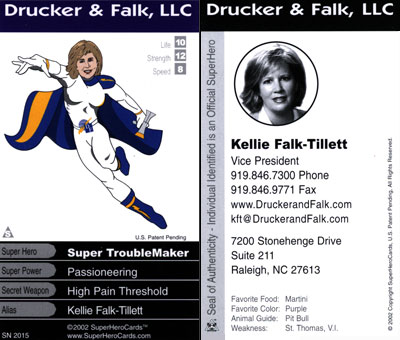
There are a ton of other super hero's in this picture that I just don't know, what I do know is that us mere mortals could use a little Super Hero help once and a while. I've found it...

Actually my partner Ron found it and I checked out Super Hero Cards on the web www.superherocards.com. These things are cool and definitely different! Different with business cards is HUGE when prospecting and making initial contacts. Check this lady out... I don't even know what she does but I'd buy something from her!

Super Hero Cards will a photo that you provide along with some key details about you and produce a fun card that works with people who like fun things. You may not give this card out to everyone... so you have your regular business cards (that should stand out somehow too) that you give to the stiffs.

You design the card right on Super Hero Cards website and then they send you a PDF proof of the card for your review. They have some designs on their site that give you an idea of what other people had done.

Here are some interesting names for sales people who wish they were really super hero's... a top 10:

10. Super Sales-Man (very obvious)
9. Wonder Sales-Woman (again, rather obvious)
8. Bat Closer
7. Spider Networker
6. I give up... it's late.

You get the idea... you can be anyone and they super-impose your face over a comic graphic that makes you look better than any picture you could submit of your body.

Check it out.

TK (AKA Techno-Man)