Recently I lost the video input on my Dell laptop and I decided to try a new Toshiba unit. I was excited to try a new laptop product line, and especially interested in using Windows Vista for the first time...
So after 2 months, I can tell you without hesitation, that Vista is not a stable operating system. I am not sure how Microsoft makes an operating system, but I do expect it to work fairly flawless! From a business position, I think Vista is too much too soon and much to do about nothing. I have used NOTHING in Vista that has enhanced my sales productivity that wasn't already present in XP.
In addition, Vista start up and shut down is a dicey endeavor. It takes forever and it often runs me through a system safe-mode/restore routine. Hit the wrong button and you can lose everything. Vista also runs me through error messages on a daily basis. Add to that the security issues it presents in browsing and I call it a lame product.
This isn't a bash Microsoft post. I have a desktop unit and three other laptops in my office that run on XP and it is extremely stable.
Only one thing is more stable... my 24 inch iMac running Mac OS X.
TK
Saturday, November 03, 2007


Tuesday, September 25, 2007
Wireless Access in Hotels
USA Today had an article in the GREEN Section today on wireless access availability in major hotel chains. The key word - WIRELESS.
There's nothing worse than being tethered to a desk in your hotel room just to have Internet access. Many chains have had wireless access in lobbies and some cafes, but not the rooms. That's changing. The other issue after access is money. Some hotels charge $9.95 a day or more to connect and others are free.
The Hyatt Place product seems to be the sales travelers best bet. All locations have wireless access in rooms and lobbies. Best of all - access is free. Hilton Garden Inn's match Hyatt Place with the free price but not all locations have wireless access in rooms. The article states "Majority of Locations."
Also according to the article usage of in-room Internet access has grown by 255% in just the first half of 2007. That's huge and outpaces airports and cafes - other top connection spots.
What sales people and other road warriors want is instant, free access. No registration and no hassles. Start promoting that service and I'll book a reservation in that hotel first.
TK
There's nothing worse than being tethered to a desk in your hotel room just to have Internet access. Many chains have had wireless access in lobbies and some cafes, but not the rooms. That's changing. The other issue after access is money. Some hotels charge $9.95 a day or more to connect and others are free.
The Hyatt Place product seems to be the sales travelers best bet. All locations have wireless access in rooms and lobbies. Best of all - access is free. Hilton Garden Inn's match Hyatt Place with the free price but not all locations have wireless access in rooms. The article states "Majority of Locations."
Also according to the article usage of in-room Internet access has grown by 255% in just the first half of 2007. That's huge and outpaces airports and cafes - other top connection spots.
What sales people and other road warriors want is instant, free access. No registration and no hassles. Start promoting that service and I'll book a reservation in that hotel first.
TK
Saturday, September 22, 2007
Constant Contact
One of the best products I've found in the last year is called Constant Contact and it's a website designed to manage your email advertising to your clients.
Constant Contact allows you create email campaigns for your database including newsletters, announcements, press releases and thank you messages. You have the ability to begin working with numerous templates and make all types of adjustment including uploading logos and photos.
Here are some of the uses I've implemented with CC:
1. Newsletter - I send semi-monthly newsletters to my clients.
2. Event Reminders - I send reminders to clients of upcoming seminars.
3. Surveys - CC has a survey feature that allows you to send surveys to your clients.
4. Press Releases - I use these to announce new products and events.
It's extremely easy to insert links and direct readers to others sites. Constant Contact tracks all the clicks and each email that you send can be evaluated in multiple ways.
If you're collecting email addresses you need to take a look at Constant Contact. Check them out at www.constantcontact.com.
TK
Constant Contact allows you create email campaigns for your database including newsletters, announcements, press releases and thank you messages. You have the ability to begin working with numerous templates and make all types of adjustment including uploading logos and photos.
Here are some of the uses I've implemented with CC:
1. Newsletter - I send semi-monthly newsletters to my clients.
2. Event Reminders - I send reminders to clients of upcoming seminars.
3. Surveys - CC has a survey feature that allows you to send surveys to your clients.
4. Press Releases - I use these to announce new products and events.
It's extremely easy to insert links and direct readers to others sites. Constant Contact tracks all the clicks and each email that you send can be evaluated in multiple ways.
If you're collecting email addresses you need to take a look at Constant Contact. Check them out at www.constantcontact.com.
TK
Friday, September 21, 2007
Multitasking for Sales People
I don’t recall the first time I heard the word, or of the concept, but multitasking is the topic of today’s post. Multitasking is the concept that has made disciplined people “production machines” and normal people “hit or miss” in their performance.
The moment pagers began leaving an instant text message along with a phone number multitasking has been a blessing and a curse for sales people. Spinning our wheels with multiple pieces of technology suddenly became an acceptable endeavor if we simply said “I’m multitasking.”
According to an article in the Arizona Republic, writers Christia Gibbons and Andrew Johnson “Whether it’s text messaging during a meeting, emailing while writing a report or calling from the car, recent studies have shown that multitasking can lead to a loss of focus and a decline in work quality.” It makes total sense to me. If your mind is focused on one thing then the ability of that same mind to focus on something else is diminished.
Should we be able to skillfully use different forms of technology? Of course. Should we be expected to compose an email, talk with a client on the phone and text our spouse back that Chili’s is a great place to meet for lunch, all at the same time? Nope.
Here’s some advice from someone who multitasks when needed but knows when too much is too much:
1. Never do anything with a mobile device when talking face to face with a client unless you are both waiting for a call, email, text message.
2. Don’t surf the Internet when you’re on a call with a client unless you are reviewing something that pertains to the call. Just don’t do it. Go to your desktop and stare at a blank screen.
3. Don’t text and drive. This is crazy and just became a primary moving violation offense in Arizona.
4. Be very careful when driving and talking. When you’re supposed to be driving – drive. Try taking a call then saying this to your client “hey this call is so important and I’m driving. Let me pull over and I’ll call you right back.” Then do it. You look good and deliver on a small little promise too.
5. Work in “day-tight compartments.” In other words when you launch a project, large or small, don’t start doing something else until that project is done. Need to write a letter? Don’t take a call until it’s done. Need to make an important call? Don’t check and respond to email until you’re off the call.
6. Turn off the automatic send and receive on your email. Check when you’re free. What if the mailman brought your mail throughout the day one piece at a time… would you run to the mail box every time he threw a letter in the box? No, you’d wait until he was done delivering the mail. If you’re expecting an important message, hit the send and receive message until you get it.
These are only a few ideas. Be careful out there, the world of technology really is a blessing and a curse. Make sure you’re on the right end of the dilemma.
TK
The moment pagers began leaving an instant text message along with a phone number multitasking has been a blessing and a curse for sales people. Spinning our wheels with multiple pieces of technology suddenly became an acceptable endeavor if we simply said “I’m multitasking.”
According to an article in the Arizona Republic, writers Christia Gibbons and Andrew Johnson “Whether it’s text messaging during a meeting, emailing while writing a report or calling from the car, recent studies have shown that multitasking can lead to a loss of focus and a decline in work quality.” It makes total sense to me. If your mind is focused on one thing then the ability of that same mind to focus on something else is diminished.
Should we be able to skillfully use different forms of technology? Of course. Should we be expected to compose an email, talk with a client on the phone and text our spouse back that Chili’s is a great place to meet for lunch, all at the same time? Nope.
Here’s some advice from someone who multitasks when needed but knows when too much is too much:
1. Never do anything with a mobile device when talking face to face with a client unless you are both waiting for a call, email, text message.
2. Don’t surf the Internet when you’re on a call with a client unless you are reviewing something that pertains to the call. Just don’t do it. Go to your desktop and stare at a blank screen.
3. Don’t text and drive. This is crazy and just became a primary moving violation offense in Arizona.
4. Be very careful when driving and talking. When you’re supposed to be driving – drive. Try taking a call then saying this to your client “hey this call is so important and I’m driving. Let me pull over and I’ll call you right back.” Then do it. You look good and deliver on a small little promise too.
5. Work in “day-tight compartments.” In other words when you launch a project, large or small, don’t start doing something else until that project is done. Need to write a letter? Don’t take a call until it’s done. Need to make an important call? Don’t check and respond to email until you’re off the call.
6. Turn off the automatic send and receive on your email. Check when you’re free. What if the mailman brought your mail throughout the day one piece at a time… would you run to the mail box every time he threw a letter in the box? No, you’d wait until he was done delivering the mail. If you’re expecting an important message, hit the send and receive message until you get it.
These are only a few ideas. Be careful out there, the world of technology really is a blessing and a curse. Make sure you’re on the right end of the dilemma.
TK
Saturday, September 15, 2007
Google Docs & Spreadsheets
 I've given dozens of presentations on the topic of using technology to be more productive in selling. One of my favorite websites has always been Google and the various products they have created to help users solve their technology problems.
It amazes me that their various software solutions are free. Don't get me wrong, I understand the business model, but it still amazes me how cool it is that the average consumer (and sales professional), get so much benefit for nothing.
One of the products I've been using lately to work on writing projects and proposals has been Google Docs. I actually stumbled onto the product when my laptop crashed and I needed to put the finishing touches on some writing I was doing. Like all Google products, Docs is a web-based program that allows you to create documents and spreadsheets.
Using my desktop at work with my laptop down, I would write all day and then simply save my work in Google Docs. Later in the evening I would log back into Google Docs and pull up my project exactly how I left it. Sound simple? Good solutions usually are... Check it out at Google.
TK
Tuesday, August 28, 2007
Mobile Phone Maniacs
Every day I see too many people acting like idiots with their mobile phones and Bluetooth headsets. When is the last time you saw and heard someone talking on their mobile phone that was being rude? Yesterday? Today? A minute ago?
Rudeness is on the the rise according to a survey by the Pew Research Center... 86% of respondents have said that they are occasionally irritated by other people conducting "loud and annoying" mobile phone conversations. This survey, and a 2004 survey done by Sprint, imply that those saying they see and hear rude mobile phone talkers don't believe they themselves are rude when they use their own mobile phones.
Hmmm. Doesn't seem to make sense. Obviously we mobile phone users think we're courteous when we're talking on the phone and most everyone else is rude and disruptive.
Where's the truth?
The truth is we all have a little bit of a mobile phone maniac in us. To purge the maniac in you, stop doing these three things immediately.
1. Stop making calls, and only take important calls, on your mobile phone when you are in a restaurant, using public transportation or in a non-private office setting.
Too many times when we're waiting for someone to join us for lunch or dinner we grab our phone and call someone, anyone. Just give us something to do instead of making us wait, alone, in a restaurant. Try this instead of making a phone call - look at the menu. Ask for crayons if you have to, but give the phone and everyone around you a break.
2. Stop having private phone conversations in public settings. No one cares about your personal business, but that doesn't imply they want to hear it. Walking through the mall talking about inappropriate topics isn't okay just because no one knows who you are.
3. Stop using "I'm multi-tasking" as an excuse for being rude when interacting with a human being and technology at the same time. Here's a simple rule of thumb - the human comes first! Multi-tasking when you are working alone may be a good thing... but even that is debatable. There is no debate when you are talking with someone face to face and you suddenly just grab your phone or activate your Bluetooth headset and start talking to the person one the other end of the phone. That's called being rude.
Try these three things. The noise level in the universe will decline and you can purge yourself of some poor behavior at the same time!
TK
Rudeness is on the the rise according to a survey by the Pew Research Center... 86% of respondents have said that they are occasionally irritated by other people conducting "loud and annoying" mobile phone conversations. This survey, and a 2004 survey done by Sprint, imply that those saying they see and hear rude mobile phone talkers don't believe they themselves are rude when they use their own mobile phones.
Hmmm. Doesn't seem to make sense. Obviously we mobile phone users think we're courteous when we're talking on the phone and most everyone else is rude and disruptive.
Where's the truth?
The truth is we all have a little bit of a mobile phone maniac in us. To purge the maniac in you, stop doing these three things immediately.
1. Stop making calls, and only take important calls, on your mobile phone when you are in a restaurant, using public transportation or in a non-private office setting.
Too many times when we're waiting for someone to join us for lunch or dinner we grab our phone and call someone, anyone. Just give us something to do instead of making us wait, alone, in a restaurant. Try this instead of making a phone call - look at the menu. Ask for crayons if you have to, but give the phone and everyone around you a break.
2. Stop having private phone conversations in public settings. No one cares about your personal business, but that doesn't imply they want to hear it. Walking through the mall talking about inappropriate topics isn't okay just because no one knows who you are.
3. Stop using "I'm multi-tasking" as an excuse for being rude when interacting with a human being and technology at the same time. Here's a simple rule of thumb - the human comes first! Multi-tasking when you are working alone may be a good thing... but even that is debatable. There is no debate when you are talking with someone face to face and you suddenly just grab your phone or activate your Bluetooth headset and start talking to the person one the other end of the phone. That's called being rude.
Try these three things. The noise level in the universe will decline and you can purge yourself of some poor behavior at the same time!
TK
Wednesday, August 15, 2007
Zoho CRM
 If you've been looking for a web-based CRM product that you can make some minor modifications I'd like to suggest Zoho CRM.
My friend Jeff Nelson turned me on to Zoho and I jumped into it and set up one of my clients on it to boost their sales and marketing efforts. It worked. It was up and running in less than an hour and they were able to begin managing contacts that day.
I've done a few CRM implementations in my career... the success ratio in the industry is about what I've experienced - 50% fail! That's after you've spent thousands of dollars on software, hardware and customization costs.
So to have something that you can just plug into and start using the same day is a welcome change. One of the things I like best about Zoho is it's FREE - free is good in the CRM world.
After helping my client get up and running in Zoho I decided to put my own data into ZCRM and have been equally impressed. Perhaps one of the best reasons to use a web-based CRM product is the ability to log on anywhere you can grab an Internet connection. Of course that's a double-edged sword. No connection - no information.
Overall I like this product and if you're an independent sales professional and have the responsibility for managing your own database check out Zoho at http://www.zohocrm.com/.
TK
Friday, July 20, 2007
Watch What You Do at Work
I read this article from Judith Kallos blog, www.netmannersblog.com and the title was NSFW. Read below:
"I was interviewed recently on my view in regard to the use of the acronym NSFW. Apparently some felt that an acronym noting “Not Safe For Work”, is necessary when sending e-mail to those they knew were at work to warn them that the content or links contained within were of a questionable nature and not proper for the work environment.
My reaction was there is no need for such an acronym. By virtue of having to type it should tell any astute person that they should have enough common sense and respect to not send e-mails with questionable content to someone’s work e-mail.
And, to those who have others sending you e-mails that need this acronym noted to warn you, you should be a responsible employee and tell the Sender to no longer use your business e-mail address for anything not business related. At that time you can also provide your personal e-mail address for e-mails of that nature.
It amazes me in this day and time how we spend so much time creating ways to justify things we know we shouldn't be doing in the first place. Using company e-mail for anything other than company business should include this acronym: IUE (Irresponsible Unreliable Employee)."
Judith's final paragraph is relevant, but may be too much to ask of employees in today's society. Life is moving really fast and sometimes to be a great employee - you need to be "being" a great spouse and a great parent. Those two jobs NEVER end and answering a personal email sent to your work email doesn't make you unreliable.
I do get the point though so thanks Judith!
TK
"I was interviewed recently on my view in regard to the use of the acronym NSFW. Apparently some felt that an acronym noting “Not Safe For Work”, is necessary when sending e-mail to those they knew were at work to warn them that the content or links contained within were of a questionable nature and not proper for the work environment.
My reaction was there is no need for such an acronym. By virtue of having to type it should tell any astute person that they should have enough common sense and respect to not send e-mails with questionable content to someone’s work e-mail.
And, to those who have others sending you e-mails that need this acronym noted to warn you, you should be a responsible employee and tell the Sender to no longer use your business e-mail address for anything not business related. At that time you can also provide your personal e-mail address for e-mails of that nature.
It amazes me in this day and time how we spend so much time creating ways to justify things we know we shouldn't be doing in the first place. Using company e-mail for anything other than company business should include this acronym: IUE (Irresponsible Unreliable Employee)."
Judith's final paragraph is relevant, but may be too much to ask of employees in today's society. Life is moving really fast and sometimes to be a great employee - you need to be "being" a great spouse and a great parent. Those two jobs NEVER end and answering a personal email sent to your work email doesn't make you unreliable.
I do get the point though so thanks Judith!
TK
Sunday, July 15, 2007
Selling and Technology
It's been my unique opportunity to manage sales people at all levels of technical experience. Some were pretty savvy and some were techno-illiterate.
I've implemented CRM software (failing more than succeeding), and taken people from zero experience to proficiency through training, cajoling and demanding. Have you ever heard of a salesperson in a company you've worked for say something like this:
"Just let me sell! I'm not good with the computer and can't you pay someone to do my computer work?" When automation was sweeping its way through every level of every company this was not uncommon. Today it's less likely to be heard as younger generations take over the workplace.
No matter what your perspective, if you use technology to manage your sales efforts, you'll be further along than if you didn't. Here's a quote that's posted just to the right of this article...
"Selling today is driven by technology. Show me a sales professional that doesn't embrace technology, and I'll show you someone that is not reaching their full potential."
I've implemented CRM software (failing more than succeeding), and taken people from zero experience to proficiency through training, cajoling and demanding. Have you ever heard of a salesperson in a company you've worked for say something like this:
"Just let me sell! I'm not good with the computer and can't you pay someone to do my computer work?" When automation was sweeping its way through every level of every company this was not uncommon. Today it's less likely to be heard as younger generations take over the workplace.
No matter what your perspective, if you use technology to manage your sales efforts, you'll be further along than if you didn't. Here's a quote that's posted just to the right of this article...
"Selling today is driven by technology. Show me a sales professional that doesn't embrace technology, and I'll show you someone that is not reaching their full potential."
I said this a few years back when I began teaching training sessions to salespeople from all industries on the topic of using technology in their business. It was true then and it's true now. The challenge many of us have is that we don't use the tools we have because we don't practice the "Law of Application."
In relation to sales technology, the Law of Application would imply that if you use any of the tools you've been given, you'll get a certain result, and the more intensely you use the technology, the greater your result. Consider using a contact management program such as Microsoft Outlook...
If you use Outlook for email and calendaring you'll be more organized than if you used nothing, and the more faithful you are to planning and entering data, the more organized you'll be.
TK
Sunday, July 01, 2007
iPhone Debut in Phoenix
 This is... you know I didn't get her name, but she was the first one in line at the Biltmore Apple store in Phoenix who would let me take her picture.
She was actually the second person in line for the recent release of the iPhone. This first person wouldn't let me take his picture. Whack-job. He was a nice enough guy, talked to me why he was willing to camp out and be first in line - just didn't want his picture taken. (Maybe he's wanted by the law.)
This woman was from Maine and was visiting Phoenix in some work capacity which I don't recall all of the specifics. Her mother was number three in line, but only as moral support, the mom wasn't going to buy the iPhone. She obviously didn't think about getting a few and posting them on eBay!
There were plenty of people staying busy in the line that
 wrapped around the back of the building by 9am. Not sure where it went after that, but despite the fact that it reached 100 degrees there is no nicer place to hang out than the Biltmore in Phoenix! A few trips to the bathroom at Neiman Marcus and a couple of conjugal visits (to visit the iPhone) inside the store before 6pm and time would fly by...
This was the last guy in line and he was a lot more talkative, yet I don't recall his name either! I need to work on this reporting thing. I'd say when this photo was taken there were less than 100
 people in line. The Biltmore grounds staff were putting up umbrellas for these folks to have some shade which was very cool on their part.
You can tell he was having fun, all alone, ready to wait nine hours in line for the iPhone. When is the last time a non-gaming tech product caused such anticipation? The iPhone will be big and Apple, Inc will reap big rewards for the rest of the year.
TK
Saturday, June 23, 2007
Device Etiquette
I really like Judith Kallos and her writing on etiquette. Occasionally, with her permission, I repost her articles. Here is something she posted on June 20th on "Blackberry Etiquette" where she reminds us, etiquette is the same no matter which mobile technology we’re using.
Thanks Judith!
TK
Blackberry Etiquette
“Is Blackberry Etiquette any different than E-mail Etiquette? Nope. However, for some reason I get e-mails daily asking about Blackberry Etiquette as though by virtue of the device, courtesy doesn't apply. Mainly the checking and responding to e-mails while in a meeting.
If you think about it, Etiquette in general is just a way to behave when taking into consideration how your actions (or lack thereof) could have an affect on others. Technology use, whether it be e-mail, Blackberrys, IMs or even cell phones does not mean you do what you want, how you want or when you want without consideration for proper practices and for others. Sadly, all too many think that with technology anything goes. Wrong.
Regardless of what tool you are using, you simply need to be aware of how to use it properly with consideration for others. This means not answering e-mails on your Blackberry when in a meeting. Or talking loudly on your cell phone where others are privy to your conversation whether they like it or not (movies, restaurants, etc.). Or sending/forwarding e-mails exposing all your contact's addresses to strangers.
To hide behind technology as an excuse to not be courteous because the other side isn't there for you to be accountable to, is self-serving at best. To reply to e-mails on your Blackberry while in a meeting clearly reflects your lack of business savvy and professionalism. Your full attention should be on the meeting.
Courtesy and perception go hand in hand. Without courtesy, the perceptions you leave in your wake will tell people exactly what they need to know about you -- and it probably won't be positive.”
Check out Judith's Tech Etiquette Blog at http://www.netmannersblog.com/.
Thanks Judith!
TK
Blackberry Etiquette
“Is Blackberry Etiquette any different than E-mail Etiquette? Nope. However, for some reason I get e-mails daily asking about Blackberry Etiquette as though by virtue of the device, courtesy doesn't apply. Mainly the checking and responding to e-mails while in a meeting.
If you think about it, Etiquette in general is just a way to behave when taking into consideration how your actions (or lack thereof) could have an affect on others. Technology use, whether it be e-mail, Blackberrys, IMs or even cell phones does not mean you do what you want, how you want or when you want without consideration for proper practices and for others. Sadly, all too many think that with technology anything goes. Wrong.
Regardless of what tool you are using, you simply need to be aware of how to use it properly with consideration for others. This means not answering e-mails on your Blackberry when in a meeting. Or talking loudly on your cell phone where others are privy to your conversation whether they like it or not (movies, restaurants, etc.). Or sending/forwarding e-mails exposing all your contact's addresses to strangers.
To hide behind technology as an excuse to not be courteous because the other side isn't there for you to be accountable to, is self-serving at best. To reply to e-mails on your Blackberry while in a meeting clearly reflects your lack of business savvy and professionalism. Your full attention should be on the meeting.
Courtesy and perception go hand in hand. Without courtesy, the perceptions you leave in your wake will tell people exactly what they need to know about you -- and it probably won't be positive.”
Check out Judith's Tech Etiquette Blog at http://www.netmannersblog.com/.
Thursday, June 21, 2007
iPhone Prepares for Debut
 June came quickly and the iPhone is ready to debut at AT&T and Apple stores all over the country. The 29th is "iDay" and we'll see how high Apple, Inc. stock can go!
There is no doubt that this phone is a huge technological achievement and like all Apple products... a work of art. Functional art. I'm not sure how many people will be buying the iPhone on the 29th or what sales will look like in December, but the smart phone market will never be the same with Apple in the mix.
The main challenge the iPhone faces will be it's hard drive capacity. It may have some bugs, and there may be some minor design modifications in the first six months (I'll wait for those before purchasing one), but the major challenge is the lack of storage space.
If I'm going to spend $599.00 on a phone that's supposed to take the place of my iPod - it better have more than 8 gigs of storage.
TK
Friday, June 08, 2007
Live Phone Help
One of the most frustrating experiences in dealing with technology is not having access to live human beings to assist with challenges.
PC Magazine gave out a few phone numbers that I wanted to pass along including a website that details phone numbers for 500 different companies. The site lets you search a number of different categories. Here's a few of my favorites:
Apple - 800-275-2273
Dell - 800-624-9896
Toshiba - 800-457-7777
Amazon - 800-201-7575
eBay - 800-322-9266
Netflix - 888-638-3549
PayPal - 888-221-1161
Sprint Mobile - 877-349-4413
Check out the Get Human 500 Database for a list of companies, their phone numbers and prompts that get you to a living, breathing English speaking humanoid!
TK
PC Magazine gave out a few phone numbers that I wanted to pass along including a website that details phone numbers for 500 different companies. The site lets you search a number of different categories. Here's a few of my favorites:
Apple - 800-275-2273
Dell - 800-624-9896
Toshiba - 800-457-7777
Amazon - 800-201-7575
eBay - 800-322-9266
Netflix - 888-638-3549
PayPal - 888-221-1161
Sprint Mobile - 877-349-4413
Check out the Get Human 500 Database for a list of companies, their phone numbers and prompts that get you to a living, breathing English speaking humanoid!
TK
Tuesday, May 15, 2007
Vonage V-Phone
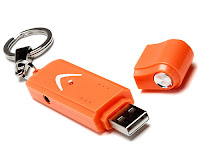 VI don't know why I get so excited about stuff like this, but the Vonage V-Phone is really a cool concept phone. The photo you see to the left is the new Vonage V-Phone. Vonage is the VoIP provider that has a huge advertising push on and is finally getting traction.
You've seen their commercials... I like the one with the woman who sees dolphins out in the ocean and wants to jump in and swim with them (unfortunately they happen to be sharks), and even a Vonage box to the head doesn't stop her from jumping in the water - people do stupid things - like not use Vonage. That's the pitch. Check out YouTube for all the Vonage commercials - they really are hilarious.
The V-Phone is essentially a USB Drive with a headset that plugs into it. The drive has storage
 capacity for the things you usually float to an external drive, but more importantly, the drive contains the software that works the "phone" and a speaker/headset that simply plugs into the device.
This is the type of device you can wear around your neck and plug into any computer that has a high-speed Internet connection and you are ready to talk - and talk - and talk! The cost of this little gizmo is what I like to call "EASY" at $39.99 for the phone and $24.99 per month for UNLIMITED calls anywhere in the US and Canada.
VoIP Technology is only getting better and better and this device is perfect for parents with students out of state or business people who need a back up phone option. Check one out.
TK
Monday, April 02, 2007
Mobile Phone Backup
If you're not using a smart phone yet I suggest you get one. However if you're like most salespeople, you don't like other people telling you what to do, not even your manager!
So who am I to force you into something as trivial as a smart phone? The same person that's going to suggest you do something to back up the data on your current mobile phone.
Anyone ever lost their mobile phone along with all of their contacts?
If you're using a standard mobile phone there are programs for backing up your data. Verizon, Sprint, Alltel and Cingular all have programs for backing up your contacts. There are fees associated with each service and some are reoccurring monthly fees.
Two other options I recommend are the CellStik and Backup-Pal.
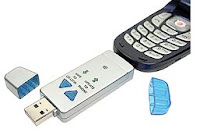 The CellStik runs $39.99 and plugs into the bottom of your mobile phone to receive data from your phone and a USB connector on the other end to deliver data to your desktop or laptop computer. CellStik comes with the software needed to save mobile phone contacts with the push of a button. CellStik is available for LG, Samsung and Motorola phones. Unfortunately it's not compatible with Macs.
Backup-Pal removes the need for a desktop or laptop in the backup equation. Backup-Pal plugs directly into your mobile phone via phone-specific adapters and again, with the push of a single button saves all of your contact information. Again this device is picky about the phones it wants to work with... Nokia, Samsung and Motorola models are the only devices that get to play with Back-Up Pal.
In the end my advice is for you to embrace the future and grab a smart phone whether it be a BlackBerry, Treo, Moto Q or one of a dozen other smart phone products. These phones are designed to be backed up A LOT because they carry your calendar, tasks and CONTACTS.
TK
So who am I to force you into something as trivial as a smart phone? The same person that's going to suggest you do something to back up the data on your current mobile phone.
Anyone ever lost their mobile phone along with all of their contacts?
If you're using a standard mobile phone there are programs for backing up your data. Verizon, Sprint, Alltel and Cingular all have programs for backing up your contacts. There are fees associated with each service and some are reoccurring monthly fees.
Two other options I recommend are the CellStik and Backup-Pal.
 The CellStik runs $39.99 and plugs into the bottom of your mobile phone to receive data from your phone and a USB connector on the other end to deliver data to your desktop or laptop computer. CellStik comes with the software needed to save mobile phone contacts with the push of a button. CellStik is available for LG, Samsung and Motorola phones. Unfortunately it's not compatible with Macs.
Backup-Pal removes the need for a desktop or laptop in the backup equation. Backup-Pal plugs directly into your mobile phone via phone-specific adapters and again, with the push of a single button saves all of your contact information.
 Again this device is picky about the phones it wants to work with... Nokia, Samsung and Motorola models are the only devices that get to play with Back-Up Pal.
In the end my advice is for you to embrace the future and grab a smart phone whether it be a BlackBerry, Treo, Moto Q or one of a dozen other smart phone products. These phones are designed to be backed up A LOT because they carry your calendar, tasks and CONTACTS.
TK
Wednesday, March 21, 2007
d_skin Disc Protectors
 Once in awhile I run across a product that really is useful for every day applications and the d_skin Disc Protector product is that type of product.
d_skin is a clear protective piece that goes over your CD's DVD's and games and prevents scratches and the ultimate demise that typically fall upon the disks we have in my house. I could show you DVD's in our movie collection that not only will no longer play, but look like they were a prop from the last Texas Chainsaw Massacre film. I'm not sure what my kids do with these disks... all I know is it makes me cringe to turn them over.
The d_skin works like this:


 Simply snap on the skin over the readable part of the disk. The design actually has the ability to go over the disk and "snap" into place - you'll be surprise at how it stays on - and it does stay on. After that you simply play the disk... the d_skin stays on indefinitely because the d_skin is laser transparent. If something happens to the d_skin (scratches, peanut butter etc.), simply snap it off and put on a new one. The disk... stays as new as when you first touched it. d_skin is available just about anywhere electronics are sold or you can check them out on the web at d_skin.
TK
Monday, March 12, 2007
Crackberry.com... Seriously!
It had to happen - a group has created a website dedicated to those who have become addicted to their BlackBerry devices... http://www.crackberry.com/. Seriously.
I registered.
Not that I'm an addict, I've actually trained myself not to wear my phone... most of the time it's clipped to my briefcase. So what kind of content would you expect to see on a site dedicated to BlackBerry addicts? More than you might expect. I expected a comedic approach with little else. Instead I found a fun comedic approach with serious content and very useful information.
One of the best articles on the front page came from the Wall Street Journal and deals with parents using BlackBerrys when they should be spending time with their children. Click Here for the article which was written by Katherine Rosman.
Also on the site, the 13 Steps to beating the CrackBerry habit... here they are:
1. Admit we were powerless over our CrackBerries
2. Admit to the universe, to ourselves, and to another human being the exact nature of our CrackBerry addiction
3. We must come to believe that only the greater power of wireless-lessness can restore us to sanity.
4. We must make a decision to turn our will and our lives over to the power of unconnectedness and eschew knowing if someone is mailing us at this very minute.
5. Make a searching and fearless moral inventory of our CrackBerry use
6. Make a list of all persons we have harmed through our rudeness, inconsideration and pretentious self-involvement, and make amends to them all.
7. Turn off the CrackBerry. Now.
8. Realize that you are not the center of the universe.
9. Set limits on BlackBerry use.
10. Turn off the BlackBerry during all meetings, classes, presentations, weddings and funerals.
11. Know that the world actually functioned before BlackBerries and that people managed to survive with ancient tools like phones and desktop computers.
12. Having fulfilled these steps know that you control the CrackBerry.
13. Having had a spiritual awakening as the result of these steps, carry this message to all CrackBerry addicts, and to practice these principles in all our affairs.
Great site. Nice graphics and solid content. CrackBerry was the word of the year in 2006 (who has that thrilling job), and now it has it's own website. Well deserved. Check this site out... even if you carry a Treo!

TK
I registered.
Not that I'm an addict, I've actually trained myself not to wear my phone... most of the time it's clipped to my briefcase. So what kind of content would you expect to see on a site dedicated to BlackBerry addicts? More than you might expect. I expected a comedic approach with little else. Instead I found a fun comedic approach with serious content and very useful information.
One of the best articles on the front page came from the Wall Street Journal and deals with parents using BlackBerrys when they should be spending time with their children. Click Here for the article which was written by Katherine Rosman.
Also on the site, the 13 Steps to beating the CrackBerry habit... here they are:
1. Admit we were powerless over our CrackBerries
2. Admit to the universe, to ourselves, and to another human being the exact nature of our CrackBerry addiction
3. We must come to believe that only the greater power of wireless-lessness can restore us to sanity.
4. We must make a decision to turn our will and our lives over to the power of unconnectedness and eschew knowing if someone is mailing us at this very minute.
5. Make a searching and fearless moral inventory of our CrackBerry use
6. Make a list of all persons we have harmed through our rudeness, inconsideration and pretentious self-involvement, and make amends to them all.
7. Turn off the CrackBerry. Now.
8. Realize that you are not the center of the universe.
9. Set limits on BlackBerry use.
10. Turn off the BlackBerry during all meetings, classes, presentations, weddings and funerals.
11. Know that the world actually functioned before BlackBerries and that people managed to survive with ancient tools like phones and desktop computers.
12. Having fulfilled these steps know that you control the CrackBerry.
13. Having had a spiritual awakening as the result of these steps, carry this message to all CrackBerry addicts, and to practice these principles in all our affairs.
Great site. Nice graphics and solid content. CrackBerry was the word of the year in 2006 (who has that thrilling job), and now it has it's own website. Well deserved. Check this site out... even if you carry a Treo!

TK
Tuesday, February 27, 2007
Sprint Gets the Moto Q
 Finally Verizon loses its grip on the Motorola Q and the yellow screen to to the left tells you Sprint got the goods!
I've been using Sprint for years and I love one thing about the service - it's pretty cheap (as in low cost for those of you using Verizon.) I use Sprint's BlackBerry 8700 product and love it, and the Moto Q is a welcome addition to the choices Sprint smart phone users now have to choose from.
Unfortunately Sprint is following the same BS other carriers do when it comes to current, loyal and satisfied clients... they jack up the price! If I want this phone I'll pay $449 buck rogers to get it. That's because I'm a Sprint card-carrying advocate. Quite the reward huh.
If you're a customer of one of the other mobile phone carriers what will you pay? $99.99 plus a two year lock on your business. I know this is what all the carriers do but that doesn't make it right - so they must think it's smart business - I don't get it.
Give me great service, competitive pricing plans and the top phones to select from and I'll never leave your service. I'd be a customer for life, and with 5 phones on my plan, I'd think that I'd be worth something too!
Give me a new Moto Q Sprint. I want to try it and I'll renew my plan for another two years, but I don't want to pay $449 for it!
(Don't forget the Q is a killer phone and I've written positive reviews on it in the past.)
TK
Tuesday, February 13, 2007
VoIP Phone Technology
 When I recently opened a new office in Phoenix it was suggested that I try VoIP service for our business lines. I was a bit skeptical because the technology hasn't really caught on and in fact, at the time, I don't think I understood how the technology worked.
VoIP is short for "Voice over Internet Protocol" and simply put, you plug your phone into an Internet connection and it works just like it's a phone line. Now I understand the technology and I like it. I like it a lot.
My company uses service from business VoIP provider Packet 8. (Packet 8 is like Vonage except for business.) Vonage has the bucks behind it to advertise like CRAZY and you see them all over TV and the Internet. Packet 8 doesn't advertise, but it does allow my firm to have a large company phone system at a fraction of the cost. Their product is called "Virtual PBX" and after having used the phones and the features of Packet 8 I'm extremely pleased.
Some of the features I like about the Virtual PBX product are:
1. Unlimited phone calls - once I purchase a phone system (about $100) there is a flat usage fee per month. Call all day and all night for $40 bucks.
2. The phone can be anywhere in the country and it functions like it's in the next office. I can transfer calls and intercom the phone just as if it were 10 feet away.
3. Each unit has a direct line and is part of my system. So I can let me clients bypass an automated attendant and get me direct.
4. When I miss a call and a voice mail message is left for me, the system sends me an email with a sound file so I can listen to the message instantly without calling into the system.
5. Finally, I can add lines as needed and the system just continues to grow. If I want to add employees to the system and they don't need a phone, they simply receive a "Virtual Extension" and are added to our voice mail. Incoming calls can be transferred to the virtual extension and the call will be forwarded to any phone anywhere in the country.
My company is still playing with the Packet 8 product and their are some downsides... your phone system is at the mercy of your Internet service. If Internet goes down - phone goes down. That's happened once in the last 90 days. Not a big deal... yet.
Overall - thumbs up to VoIP.
TK
Monday, February 12, 2007
CET OVERLOAD!
 I coined the phrase "CET" (an acronym for Call, Email, Text) referring to the three communication functions routinely performed on smart phones last year when I became "too much" of an expert at using my BlackBerry. CETing has reached overload for some users and I believe the challenge has become so severe, that the smart phone has brought on an onslaught of Adult ADD!
Seriously. If you can't refrain for more than 10 minutes from continually grabbing your Treo and checking your email account (I have two email accounts on my BlackBerry - so I have an excuse), checking for missed calls or seeing who sent you the last text message then you've got serious focus challenges.
In an effort to help resolve this matter I offer this advice - first and foremost, refrain from CETing during important sales activities, such as initial contact, presentation and final closing opportunities. Don't grab that device and even think of looking at it when you should be paying attention to a client.
I also recommend that you refrain from CETing at the dinner table, in church or while ordering your Tall, Decaf Mochachino. There are so many things to do on your smart phone that you might forget that the world continues to spin while your thumbs are moving a mile a minute. If you're in line anywhere, don't CET without occasionally looking up.
Snap out of it! Business and life will happen without you weighing in on every issue and event so chill out. As my mentor Jim Rohn says "where ever you are - be there."
TK
Subscribe to:
Posts (Atom)
.0.jpg)

